Hello Steve Brydson,
Could you create a new ticket with more examples of what’s working differently?
Replies for tickets on suppota
Hello Steve Brydson,
Could you create a new ticket with more examples of what’s working differently?
Ashan,
Go to Week 18-24 and click on “This Week” button, again go to Week 18-24, manually go to Week 11-17:
https://dev2.myeventon.com/test-423/
Hello,
Thank you for your messages, I am going to assign this ticket to Ashan and he will be able to take it from here and find you a solution. Please allow some time for him to get back to you, we greatly appreciate your patience and thank you for being a eventon customer! Also please disable any IP blocking on your site if there are any.
I can edit the file, but sure how it will affect other functionality on the website, I am afraid.
Please note that the fix must be applied not on EventON, but Fusion Builder that isn’t our product.
Ashan,
Please check both.
2. Take a look at
https://dev2.myeventon.com/test-422/
This event is visible in both May and June:
https://dev2.myeventon.com/events/double/
Hello,
Thank you for your messages, I am going to assign this ticket to Ashan and he will be able to take it from here and find you a solution. Please allow some time for him to get back to you, we greatly appreciate your patience and thank you for being a eventon customer! Also please disable any IP blocking on your site if there are any.
Hello,
Please follow
https://docs.myeventon.com/patch-fixes/organizer-and-social-icons-not-showing-on-eventcar/
4.6 version also fixes the issue.
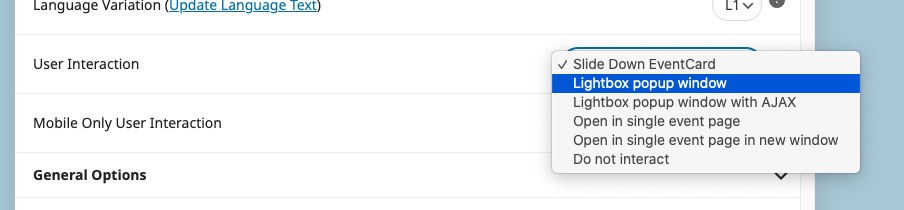
Use “User Interaction” in Shortcode Generator:
Ashan,
The same on dev2:
https://dev2.myeventon.com/test-421/
Click on “CLEAR ALL” and it will remove all events.
Helo,
Thank you for your messages, I am going to assign this ticket to Ashan and he will be able to take it from here and find you a solution. Please allow some time for him to get back to you, we greatly appreciate your patience and thank you for being a eventon customer! Also please disable any IP blocking on your site if there are any.
I wanted to rename Site Health plugin folder to deactivate it to fix the fatal error.
Can you enable Troubleshooting Mode while being logged-in as dev@:
https://www.tinwoodestate.com/wp-admin/site-health.php?tab=troubleshoot