Hi Helen,
Please create a new separate ticket to allow us investigate your issue.
Replies for tickets on suppota
Hi Helen,
Please create a new separate ticket to allow us investigate your issue.
Hello Nicoline,
Please add this CSS code to EventON > Styles (If you don’t see any change, EventON > Scripts & Styling > turn off Write dynamic styles to header > save settings > turn on Write dynamic styles to header):
.evo_metarow_directimg img { min-height: auto; }
Let us know if this works for you.
Hello,
You can use any email and then send us login/pass. We need access to your website to figure out what’s the issue with Google Map.
1. Not sure how you do this. Could you tell us more? You usually import events using CSV Import add-on:
https://www.myeventon.com/addons/csv-event-importer/
2. & 3. Need to check the website to see this.
I am having the same problem, please can you post the solution on here so I can see what needs to be done
Thanks
Helen
Hello,
Please send us wp-admin access to your site as a private message for us to further assist your situation.
Take a look at
https://docs.myeventon.com/documentations/why-my-site-and-eventon-page-loading-slow/
Also try EventON > Advanced > Select event calendar WP Query method.
Please add this CSS code to EventON > Styles (If you don’t see any change, EventON > Scripts & Styling > turn off Write dynamic styles to header > save settings > turn on Write dynamic styles to header):
.eventon_events_list .eventon_list_event .featured_event .evoet_c2 { padding-top: 22px; }
Hi Johannes,
Please share with us your order number.
Hello Gerard W,
We always check all featured requests, not only the most upvoted ones. Eventually we will add all submitted functionality, it’s just we need to go from the most useful ones.
Please understand that your main problem is that you are using the shared hosting. They always limit the performance.
However, it would be advisable for you to provide us with the PHP variable parameters that the plugin needs to function optimally, in order to better assess the incident.
Simply tell them to put them to max available values.
I don’t understand what you mean. I am a designer and I don’t know programming.
What I can do? What could be the problem? Why are you attaching this image to me?
I can access the control and other settings appear. ¿?
This is fixed. Seems like the performance issue.
They have even expanded the resources by double and the website loads quickly and without problems except the calendar.
When you don’t know how much is available from the start, not sure what do they mean by this.
If it were a problem, the entire website would be slow and that is not the case.
Unfortunately, this is not correct. When you load a simple page, it’s very easy for the server so of course it loads everything quickly. But with events it’s completely different.
They have also looked to see if there was any type of blockage or any other problem that could cause the calendar to load slowly and everything is correct.
EventON is a dynamic plugin that loads more than 4000 events on your website. Try creating 4000 posts and load 50 of them at the same time on one page with all content.
I deleted all the events to upload a new csv without images to see if the calendar loaded faster but now it turns out that when I import the events the import stops after 199 events.
Your server has the performance issue loading events, so importing it’s pretty much the same story. It must have enough memory and also for example this should be set to the max: https://www.a2hosting.com/kb/developer-corner/php/using-php.ini-directives/php-maximum-execution-time/#:~:text=By%20default%2C%20the%20maximum%20execution,max_execution_time%20directive%20in%20your%20php.
These problems are taking me a long time, the website is not ready and you are taking a long time to respond without solving the problems.
We always replied during 24 hours to all of your questions. It’s just when it comes to the performance, we cannot do much when your resources are limited.
Could you be clear and tell me if your calendar is suitable for my project?
With 4000 events not sure if any dynamic events plugins will work on your server. Please try any of them.
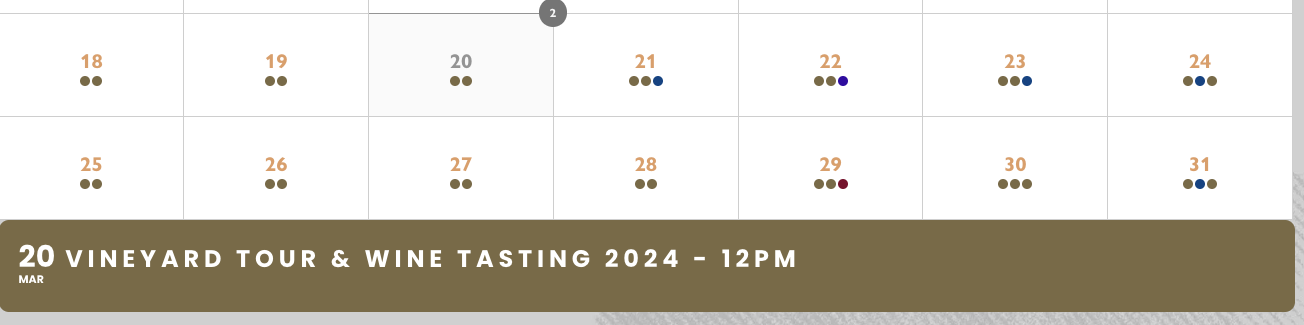
Hi Artem,
Sorry, but I’m not sure what I’m supposed to be looking at on those test links. I’ve no way of telling what date has cancelled events and therefore which dates are showing only 1 dot, rather than 2.
As an example, I’ve adjusted the shortcode on Tinwood as advised and the 20th March is showing 2 dots still, despite there only being one event (the second was cancelled, so isn’t showing). I’ve also noticed when I hover over the 20th March, the dot in the right-hand corner of the box shows the number ‘2’ indicating 2 events, when there is only one because the other was cancelled. Screenshot attached and link below:
https://www.tinwoodestate.com/experience/vineyard-tours/
Please provide an email address and I will give you Admin access and a direct link to the page for which I’ve edited the shortcode.