I think this should be standard. You have sorting available for all other lists … why not this one? Especially since this is a front-end user experience issue. I will not use the rsvp manager until the sorting makes sense to a user when they see the list. I don’t think it’s a new feature request, it’s more of a fix for something that doesn’t work as well as it should.
Archives: Replies
Replies for tickets on suppota
Reply to: tickets(344067)
thankyou. updating fixed it
the maps still don’t work on most of our sites. could you advise on www.dreamcoatstars.com please?
Reply to: tickets(321419)
Hello,
I have been talking on the phone with cdmon, the company that hosts the website.
They have been testing to see if there was any problem with the website that was causing the calendar to load slowly.
There is no problem. They have even expanded the resources by double and the website loads quickly and without problems except the calendar.
I have been told that although the server is shared, it is not a problem for the calendar to load so slowly. If it were a problem, the entire website would be slow and that is not the case.
They have also looked to see if there was any type of blockage or any other problem that could cause the calendar to load slowly and everything is correct.
The only thing missing is for you to answer the question that the hosting company asks me about “the PHP variable parameters that the plugin needs to function optimally, in order to better assess the incident”.
This leads us to the fact that what is not working is the calendar.
Can you help me see what the problem is with calendar events not loading quickly?
I hope for a quick response.
Thank you,
Reply to: tickets(344065)
Hello,
Are you referring to EventON > Download all eventON events?
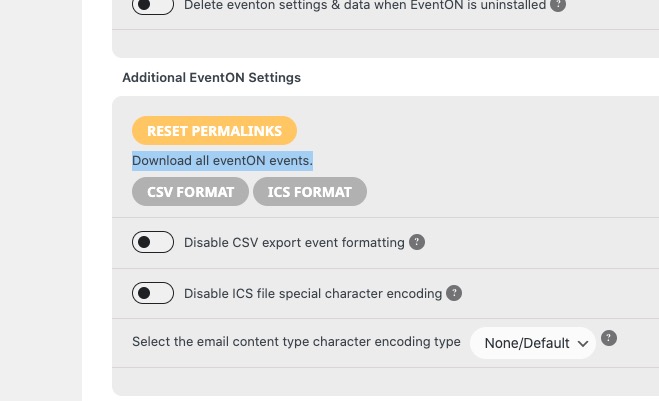
Could you update EventON to 4.5.9 and check again?
To update eventon to latest version: If you are unable to do autoupdate, you can go to codecanyon your account > download and get the latest eventon version as zip file. Then you can go to your website > make sure “Delete eventon settings & data when EventON is uninstalled” is Deslected from eventon settings, delete old eventon, install new one and activate. This link will further explain the process it. Also you can follow us on twitter to get real-time announcements on updates!
Reply to: tickets(344106)
Hello,
Thank you for your great suggestion, at the moment it is not supported. However please create a new ticket and select Feature Request as category so others can vote on your idea and get it moved into development faster.
Reply to: tickets(343721)
You are using the latest versions.
Could you try the event?
Reply to: tickets(344109)
Hello,
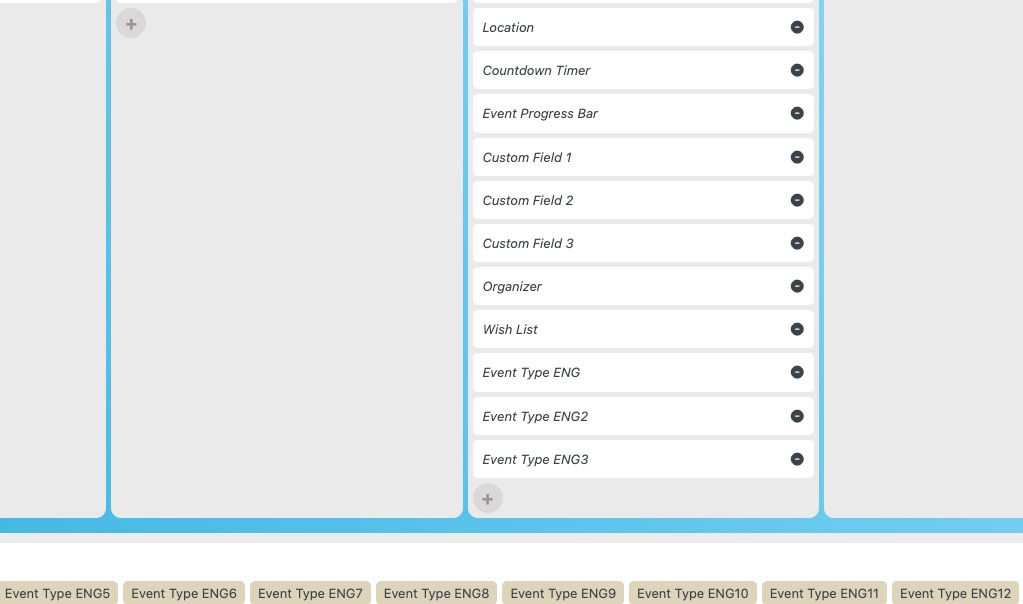
Please go to EventON > EventTop > make sure that EventType and 2, 3, 4 and so on are added.
Reply to: tickets(343782)
Please disable plugins one by one to figure out which one of them causes this.
Reply to: tickets(344115)
Hello,
Unfortunately, we unable to help with issues related to third-party plugins. Please contact the plugin developer.
Reply to: tickets(344070)
Please add this CSS code to EventON > Styles (If you don’t see any change, EventON > Scripts & Styling > turn off Write dynamic styles to header > save settings > turn on Write dynamic styles to header):
body .ajde_evcal_calendar h4.evo_h4, .evo_lightbox h4.evo_h4, .evo_content_in h4.evo_h4, .evcal_cell_rel_events a em, .evcal_cell_rel_events a b {text-transform:none !important}