I also want to show a nice clean list but limit to the next 3 events reguarless of month but I cant seem to get this to work? what is wrong with this code as it does not limit to a number.
[add_eventon_list number_of_months=”12″ hide_month_headers=”yes” event_count=”5″ eventtop_style=’0′]
https://oceanahotelsbournemouth.co.uk/
Thanks
Andy
Hi
That’s brilliant. I did look through the guide but it was removing the month header that I could not work out!
Is there a preset style I can use to remove the rounded corners? as the site does not use this design style.
Thanks
Andy
Hi Andy,
You can use the code below to list your events without showing month headers
[add_eventon_list number_of_months=”12″ hide_month_headers=”yes”]
Take a look at our short code guide below for more details
https://docs.myeventon.com/documentations/shortcode-guide/
I am still having issues with events showing — Right now the events do not span until the end of their times even tho it is set to do that. Please help asap. No events are showing past their times.
I see whats going on so the new ICS importer we use the latest version of the ICAL parsing library from https://github.com/OzzyCzech/icalparser which require PHP version 8.1+
that is why all the errors are making it not run. Any chance you can update your website server PHP to 8.1 version?
That worked perfectly. Thank you!
Thank you for the reply.
I’m not sure why our installation would be different than yours, to be honest. I’ll let you investigate further.
What is a ‘non-ticket’ order, and how did this get set? Clearly it should be a ‘ticket’ order… and I’ve created the product and settings via the Event page > Activate tickets for this event, and set all the settings I believed I needed to configure. If there is something I need to do to make this a ‘ticketed order’ than please advise.
However, the test link you provided did not generate a PDF either, and it too says ‘Non-ticket Order’ on the orders page. I ‘completed’ the order, and still did not receive a PDF.
If you would like to test the events/orders yourself, the payment processor is set to sandbox mode. You can use the following fake CC data to make a purchase, and test the emails/PDFs yourself, if you’d like.
CC # 4111 1111 1111 1111
Expiry: 11/31
CVV: 111
Zip Code: 11111
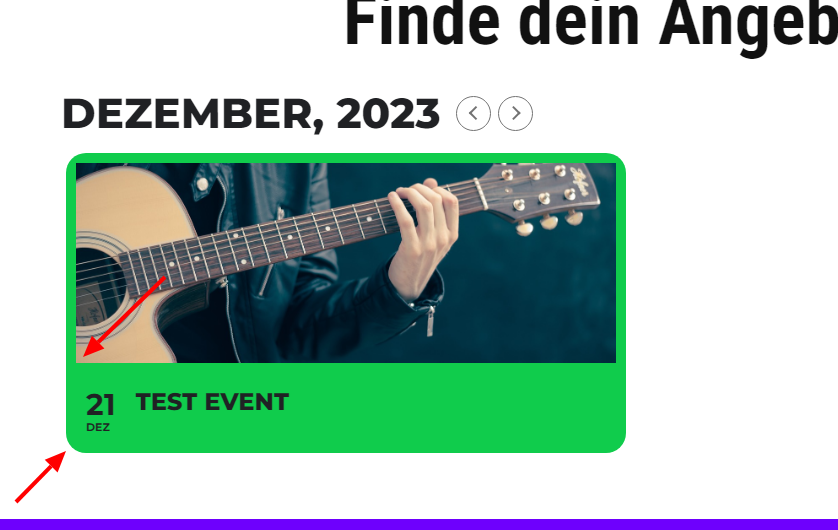
Thank you! Images in the event tile have square corners now, but the eventtile itself has still round corners
Thank you! Images in the event tile have square corners now, but the eventtile itself has still round corners
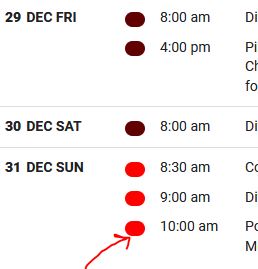
Here is screenshot of layout