We are sorry for the delay. Ashan will check this ASAP.
Archives: Replies
Replies for tickets on suppota
Reply to: tickets(335013)
Hello,
Please try this code:
#evcal_list .eventon_list_event .desc_trig.featured_event .evoet_cx em { color: red !important }
.evosv_event.llxvl
Which part this code is referring to?
…and not only circle
Could you send us a screenshot of this part?
Reply to: tickets(335038)
Hello,
Please add this CSS code to EventON > Styles (If you don’t see any change, EventON > Scripts & Styling > turn off Write dynamic styles to header > save settings > turn on Write dynamic styles to header):
.ajde_evcal_calendar.boxy .eventon_list_event.hasbgimg, .ajde_evcal_calendar.boxy.boxstyle1 .evo_boxtop, .ajde_evcal_calendar.boxy.boxstyle2 .evo_boxtop { border-radius: 0 !important; }
Reply to: tickets(325762)
Hi Artem, thanks for the links.
It looks like one of the links you sent (version 4.2.2) contains malware and is missing a bunch of important files. I would recommend removing it from your server so that nobody downloads and runs it.
On that note, do you have a clean copy of 4.2.2 by chance?
Reply to: tickets(335041)
Hello,
Please take a look at Event Lists shortcode with added Event Organizer and Number of Months:
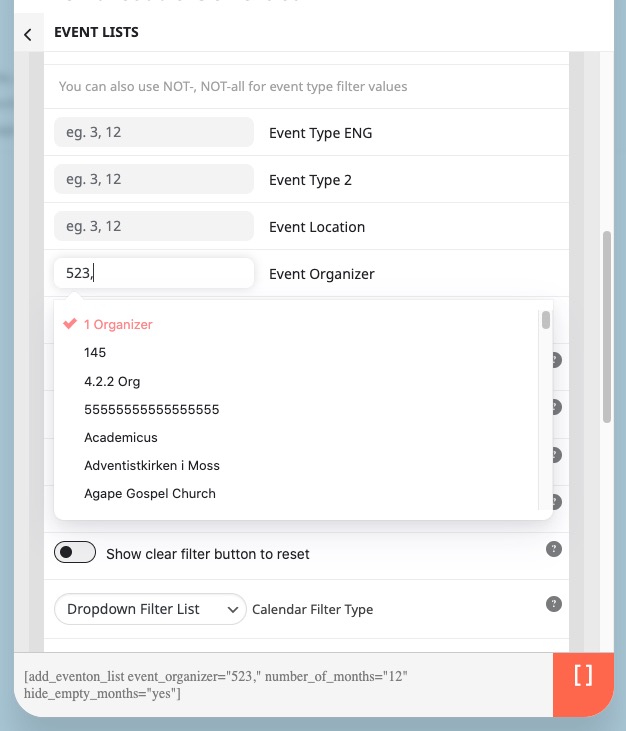
If you go to wp-admin > Events > Event Organizer, you can see that each organizer has a separate page with events.
Reply to: tickets(332134)
RSVP 2.9.9 is available. Please update and let us know.
To update eventon addons: You can download latest eventon addons from myeventon > my account. Then you can go to your website, deactivate old addon and install new one and activate then delete the old addon. This link will further explain the process. Also you can follow us on twitter to get real-time announcements on updates!
Reply to: tickets(334720)
We are sorry for the delay. As a temporary solution, please add this CSS code to EventON > Styles (If you don’t see any change, EventON > Scripts & Styling > turn off Write dynamic styles to header > save settings > turn on Write dynamic styles to header):
span.evo_start,span.evo_end, .evoslider .eventon_list_event.sldark .evcal_cblock, .evoslider .eventon_list_event.sldark .evcal_desc span, .evoslider .eventon_list_event.sldark .evcal_desc span em, .evoslider .eventon_list_event.sldark .evcal_desc span em i { background: rgba(0,0,0,.7); }
Reply to: tickets(335024)
Hello,
It seems that you also need to update WeeklyView add-on as well.
Please make sure that your version is 2.0.2.
To update eventon addons: You can download latest eventon addons from myeventon > my account. Then you can go to your website, deactivate old addon and install new one and activate then delete the old addon. This link will further explain the process. Also you can follow us on twitter to get real-time announcements on updates!
Please send us wp-admin access to your site as a private message for us to further assist your situation.
Reply to: tickets(325762)
Hello,
Please take a look at these links:
https://helpdeskx.s3.amazonaws.com/wp-content/uploads/2023/06/12031951/eventON4.3.5.zip
https://helpdeskx.s3.amazonaws.com/wp-content/uploads/2023/01/19140230/eventON4.2.2.zip
https://helpdeskx.s3.amazonaws.com/wp-content/uploads/2023/06/01042208/eventON-4.0.1.zip
https://helpdeskx.s3.amazonaws.com/wp-content/uploads/2023/01/20051245/eventON-36.zip
…the cards get screwed up…
Could you elaborate? Maybe you need to go to EventON > EventCard Design > just add fields.
Reply to: tickets(335027)
Hello,
Is it possible to send us links to some of such events, so we can take a look at them?
Please also update RSVP add-on to the latest version. To update eventon to latest version: If you are unable to do autoupdate, you can go to codecanyon your account > download and get the latest eventon version as zip file. Then you can go to your website > make sure “Delete eventon settings & data when EventON is uninstalled” is Deslected from eventon settings, delete old eventon, install new one and activate. This link will further explain the process it. Also you can follow us on twitter to get real-time announcements on updates!