Hi!
Thanks for your help. I know that I need to create a shortcode and also how to do to, but when I am doing changes the calendar is again not showing up. Your shortcode is working good and when I have put it back in, after my changes, that did not apply properly, I have recognized that you don’t use an ID for the calendar. This is in fact the only difference. I saw in the tutorial that I should use an ID, but I am ok when it is working without.
Anyway – thanks for your help.
One last thing: why the full calendar is not showing up in the settings, please? and in the language settings? Is there something wrong?
Thanks again,
Veronika
Hello,
We will attempt to re-add the custom meta fields to hopefully restore the missing data.
Can our other issues be addressed as well? The calendar is now public and we are still having issues:
- Single page events are coming up unstyled, see links below for example. The links to single events used to come up like they look on the calendar (https://dreamweek.org/events) now it’s only showing the event description and nothing else:
- We are also not able to export csv of events, we get an error.
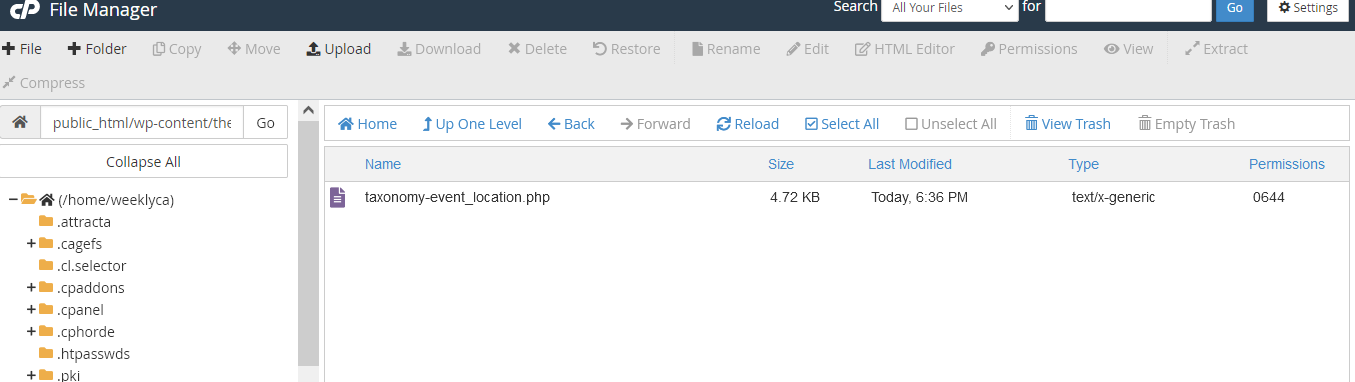
Followed these instructions to the letter. Still do not see left sidebar on this page.
File
/public_html/wp-content/plugins/eventON/templates
Copied to
wp-content/themes/customizr/eventon/
Customizing the template
Create a folder called eventon inside your current active theme. So that the path to the folder would look like.. …/wp-content/themes/–your-theme–/eventon/
Go to eventon/templates/ folder and copy the file taxonomy-event_location.php
Paste this file into the eventon folder you created inside your theme folder.
From now on the location archive page will use the template from your theme folder. Any changes you made to the template file inside theme folder will reflect on location archive page.
https://helpdeskx.s3.amazonaws.com/wp-content/uploads/2023/12/11031043/Capture-decran-2023-12-11-a-11.04.32.png
“Corse” works now:
https://www.weekendinfo.com/event-type-5/corse/
If you’ll see the same error, please follow to fix it:
https://docs.myeventon.com/documentations/single-events-page-not-working-404-error/
As for the design of the event type page, please override /plugins/eventON/templates/taxonomy-event_type.php by coping it to ../yourtheme/eventon/ folder.
Hello,
Could you update EventON to 4.5.4?
To update eventon to latest version: If you are unable to do autoupdate, you can go to codecanyon your account > download and get the latest eventon version as zip file. Then you can go to your website > make sure “Delete eventon settings & data when EventON is uninstalled” is Deslected from eventon settings, delete old eventon, install new one and activate. This link will further explain the process it. Also you can follow us on twitter to get real-time announcements on updates!
I also went to EventON > EventTop > selected Select Event Top location display data: Location Name, so now Location Address is hidden.
After the update we will check this again. Please update and let us know.
Hello,
First of please update EventON to 4.5.4.
To update eventon to latest version: If you are unable to do autoupdate, you can go to codecanyon your account > download and get the latest eventon version as zip file. Then you can go to your website > make sure “Delete eventon settings & data when EventON is uninstalled” is Deslected from eventon settings, delete old eventon, install new one and activate. This link will further explain the process it. Also you can follow us on twitter to get real-time announcements on updates!
After, what you need to do is to create a page and put there
[add_eventon wpml_l1=”en” wpml_l2=”zh-hant”]
Make sure that the quotes are double.
But you also need to create a translation (please check WPML’s documentation) of the created page and put there the same shortcode.
Please follow the instructions in this documentation to activate debug in your site to see any PHP errors recorded that can provide insight on to whats going on. Please reply with a link to debug.log file. If you are not able to do this please send us FTP access to your site so we can do this for you.
Hello,
Please try this shortcode:
[add_eventon_list number_of_months=”3″ hide_empty_months=”yes”]
Empty months will be hidden.
The thing is that if you want to show only 3 events from different months, then you need to use Event Lists: Ext:
https://www.myeventon.com/addons/event-lists-extended/
Try this shortcode on https://dev.myeventon.com/wp-admin/:
[add_eventon_el number_of_months=”12″ event_count=”3″ event_count_list=”yes” hide_empty_months=”yes”]
…because the list starts in November…
Could you try going to EventON > Time > enable Use UTC offset time globally on calendars?
Hello,
If you can export events as an ics file, please take a look at ICS Import:
https://www.myeventon.com/addons/ics-importer/
And if as a csv file, please check
https://www.myeventon.com/addons/csv-event-importer/
Try both on
https://dev.myeventon.com/wp-admin/
That’s a bummer. One of my customers has the same event every day of the year, so they would only get charged $5.00 for an entire year of events which doesn’t bode well financially for me.
I’m thinking something more relevant for my case would be a subscription add-on — ie: $100/month for unlimited events. Is that possible with EventON or an add-on?
Another helpful thing would be to limit repeat events to 30 days maximum then require another credit be used if they want to go another month.
The way things are setup right now, I’d make maybe $100/year as nearly every customer has events that repeat every month all year long.