We are sorry for the delay. Could you go to EventON > ICS Import > enable Use custom timezone for importing events (override above) and try selecting your timezone in Select Custom Event Timezone?
Archives: Replies
Replies for tickets on suppota
Reply to: tickets(332029)
We are very sorry for the delay. Ashan will check this ASAP.
Reply to: tickets(328291)
We are very sorry for the delay. No new updates on this topic, I am afraid. Ashan will check this ASAP.
Reply to: tickets(333951)
Sorry, I am not sure what you mean by this. What do you need me to disable?
Reply to: tickets(333579)
These pages don’t show any events, because you didn’t assign any to them.
Please try assigning them first and then you’ll be able to see them:
https://docs.myeventon.com/documentations/confused-event-type-categories/
Reply to: tickets(333991)
Hello,
Available options can be found here:
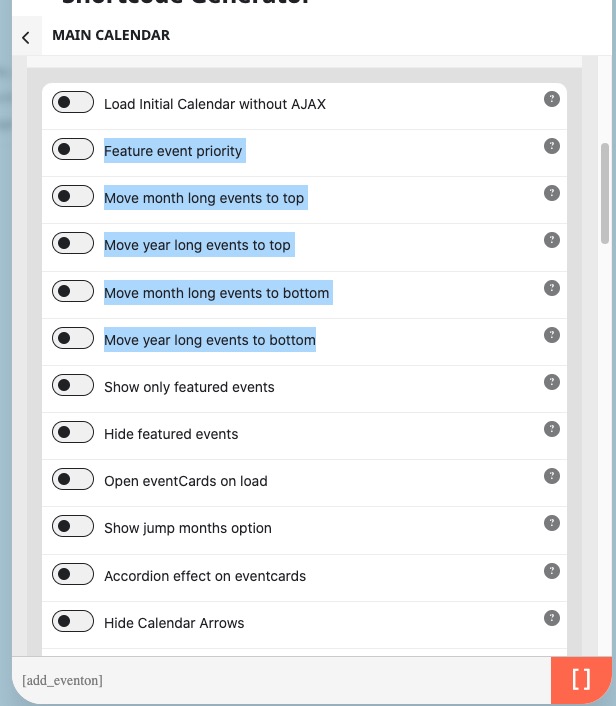
Unfortunately, events that span across several months cannot be moved. However please create a new ticket and select Feature Request as category so others can vote on your idea and get it moved into development faster.
Reply to: tickets(333969)
Hello,
Please follow this guide:
https://docs.myeventon.com/documentations/change-css-calendar/
If you don’t see any changes, try adding the code to wp-admin > Appearance > Customize > Additional CSS.
Reply to: tickets(333983)
Hello,
On Android works fine. Could you tell us more about your mobile device?
Are you having the same issue with
https://dev2.myeventon.com/test-240/
Reply to: tickets(333988)
Hello,
Is there some kind of cache plugin on the server? Could you try clearing it?
Please also try adding your code to wp-admin > Appearance > Customize > Additional CSS.
Reply to: tickets(333989)
Hello,
Please go to EventON > General or Time Settings > enable Hide past events for default calendar(s).
OR Add event_past_future=”future” to your shortcode to hide completed events.