We are glad your issue is resolved, if you have any further questions or concerns please create a new ticket. If you have a moment, we would greatly appreciate if you could kindly leave us a review at myeventon/my-account!. Cheers!
Archives: Replies
Replies for tickets on suppota
Reply to: tickets(331391)
Please add this CSS code to wp-content/plugins/eventON/assets/lib/settings/settings.css:
#ajdeEVC_arrange_box p span.fa { font-family: ‘evo_FontAwesomeS’,’evo_FontAwesome’,’evo_FontAwesomeB’ !important; display: inline-block !important; }
Or follow
https://css-tricks.com/snippets/wordpress/apply-custom-css-to-admin-area/
Reply to: tickets(331393)
We are glad your issue is resolved, if you have any further questions or concerns please create a new ticket. If you have a moment, we would greatly appreciate if you could kindly leave us a review at myeventon/my-account!. Cheers!
Reply to: tickets(331605)
Hello,
Please try going to EventON > Action User > enable Use basic textarea for event details box instead of WYSIWYG editor. This way users will be able to only add simple text.
Reply to: tickets(331626)
Hello,
Event Type is responsible to show filtered results:
https://docs.myeventon.com/documentations/confused-event-type-categories/
https://docs.myeventon.com/documentations/how-to-use-event-types-to-do-more/
You can also filter events by Event Location or Organizer:
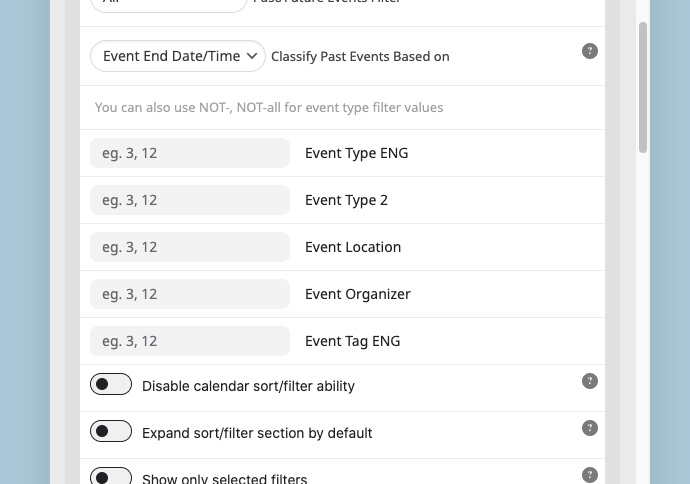
So if you want to show 2 events from Location with ID 1078, you need to use this shortcode:
[add_eventon_list number_of_months=”12″ event_count=”2″ event_location=”1078,” hide_empty_months=”yes”]
Reply to: tickets(331515)
Hi again!
I have cleared Safari history and cache and it works now.
It’s the first time in many years that I have to clear the cache 🙂
Thanks again for the great support!
Reply to: tickets(330115)
Hi Ashan – please go ahead – Revslider is needed for the landing page — but its ok for a certain time…
Thanks
Reply to: tickets(331502)
as a temp solution please add this into eventON settings > Styles
.ajde_evcal_calendar.color #evcal_list .eventon_list_event .evcal_cblock, .ajde_evcal_calendar.color #evcal_list .eventon_list_event .evcal_desc span.evcal_event_title, .ajde_evcal_calendar.color #evcal_list .eventon_list_event .evcal_desc span.evcal_event_subtitle, .ajde_evcal_calendar.color #evcal_list .eventon_list_event .evcal_desc em, .ajde_evcal_calendar.color #evcal_list .eventon_list_event .eventon_list_event .evcal_desc .evcal_desc_info, .ajde_evcal_calendar.color .eventon_events_list .eventon_list_event .evcal_cblock em.evo_day, .ajde_evcal_calendar.color .evoet_cx span, .ajde_evcal_calendar.color .evoet_cx .evo_below_title .status_reason, .ajde_evcal_calendar.color .evoet_cx .evo_tz_time .evo_tz, .ajde_evcal_calendar.color .evoet_cx .evo_mytime.tzo_trig i, .ajde_evcal_calendar.color .evoet_cx .evo_mytime.tzo_trig b, .ajde_evcal_calendar.color .evoet_cx em i, .ajde_evcal_calendar.color .evoet_cx .evo_ep_pre, .ajde_evcal_calendar.color .evoet_cx .evo_ep_time, .ajde_evcal_calendar.color .evoet_cx .evo_mytime.tzo_trig:hover i, .ajde_evcal_calendar.color .evoet_cx .evo_mytime.tzo_trig:hover b, .evo_lightboxes .color.eventon_list_event .evcal_cblock, .evo_lightboxes .color.eventon_list_event .evoet_cx span, .evo_lightboxes .color.eventon_list_event .evoet_cx span.evcal_event_title, .evo_lightboxes .color.eventon_list_event .evoet_cx span.evcal_event_subtitle, .evo_lightboxes .color.eventon_list_event .evoet_cx em, .evo_lightboxes .color.eventon_list_event .evoet_cx .evcal_desc_info, .evo_lightboxes .color.eventon_list_event .evcal_cblock em.evo_day, .evo_lightboxes .color.eventon_list_event .evoet_cx .evo_tz_time > *, .evo_lightboxes .color.eventon_list_event .evoet_cx .evo_mytime.tzo_trig i, .evo_lightboxes .color.eventon_list_event .evoet_cx .evo_mytime.tzo_trig b{color:var(–evo_color_1)}
Reply to: tickets(330934)
Its strange I am not able to replicate the count off issue on my end. New RSVP , change rsvp count changes just fine. Let me know if you are able to find out what makes the count go off.
Reply to: tickets(330173)
I see what you mean. My question is, what if a guest decided to not attend within 60 min of the event and they want to change Yes to No?
would it work, if change RSVP only allow to change yes to no or yes to maybe within 60 min ? 🙂
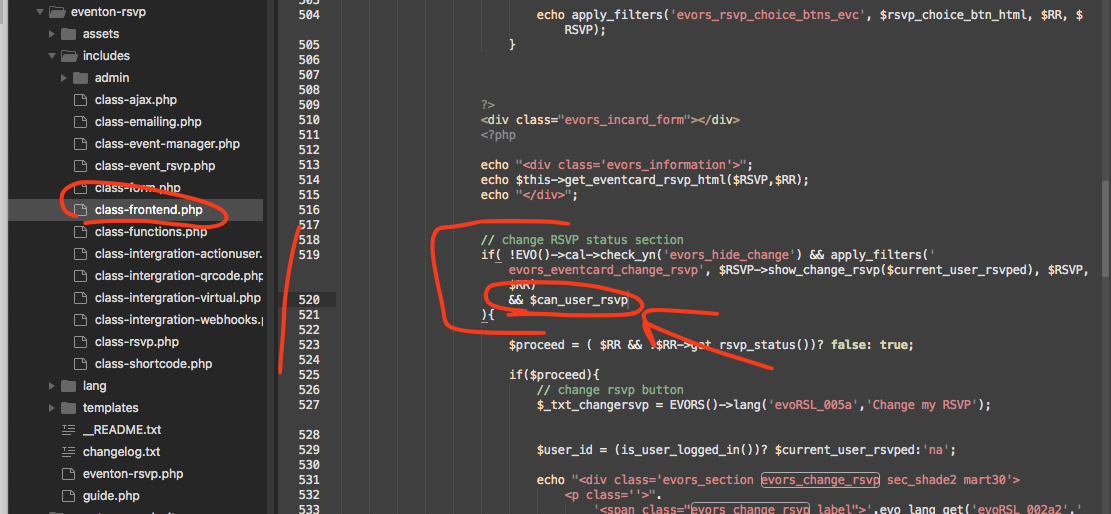
I am just trying to see how this would apply to all the users using RSVP addon. Let me see if I can share you a code snippet so change rsvp also hide with main options.
Ok see if you are able to add this code change.