Ok the downloads should be working now.
Please login using temp pass: EVO2023$calendar
This is the temp pass for both yours and your client’s myeventon.com account.
Replies for tickets on suppota
Ok the downloads should be working now.
Please login using temp pass: EVO2023$calendar
This is the temp pass for both yours and your client’s myeventon.com account.
btw I reset the myeventon.com pass for both you and your client account will let you know when this is resolved then you can change it to a different pass.
Hello José I can see this issue I am working on fixing this now!
theres a couple of different versions of woocomerce auto complete order
Please send us wp-admin access to your site as a private message for us to further assist your situation. so we can see which one you are using and see if there is a solution
the one that I use you can make auto complete just for virtual products
try
.eventon_events_list .eventon_list_event .evoet_cx .level_4, .evo_pop_body .evoet_cx .level_4 {
font-size: 15px;
}
and add it to appearance>>>>customize>>>>>additional css
currently you are using eventon 4.4
we are now up to 4.5.3
in those updates there was a move month long events to the bottom by adding
ml_toend=”yes” to the shortcode (but I believe that will only effect the month long in october)
so you will want to update
To update eventon to latest version: If you are unable to do autoupdate, you can go to codecanyon your account > download and get the latest eventon version as zip file. Then you can go to your website > make sure “Delete eventon settings & data when EventON is uninstalled” is Deslected from eventon settings, delete old eventon, install new one and activate. This link will further explain the process it. Also you can follow us on twitter to get real-time announcements on updates!
other options
you could add those 2 events as single events to the top of the calendar via shortcode (just above where you have your full cal
and then on each edit event page you could hide them from the calendar- I don’t know if thats an option you want but you could have those 2 events stand out (when editing an event you can on the right hand panel of the edit page Hide event from calendar)
and the rest of the calendar below
Yep try that and see if it makes a difference…
Done, 5 star review posted! 🙂
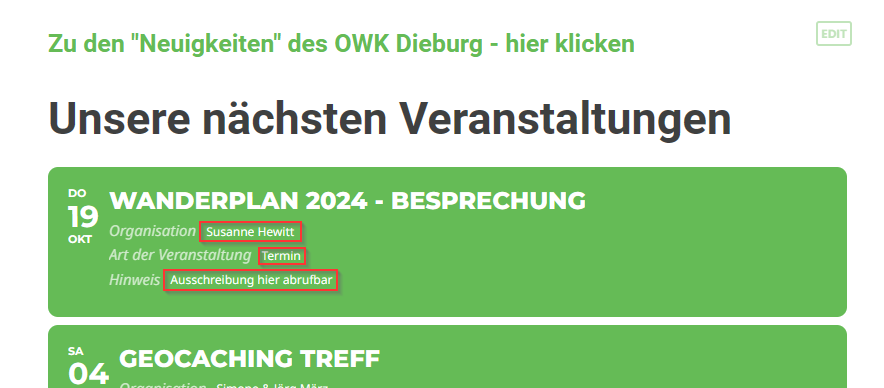
Attaching screenshot for illustration. The text areas that I want to increase to 15px are highlighed.
See video below
https://vimeo.com/876041151
as for open street map
Thank you for your great suggestion, at the moment it is not supported. However please create a new ticket and select Feature Request as category so others can vote on your idea and get it moved into development faster.