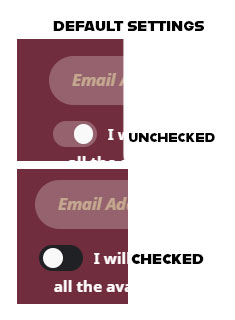
Please fix this. It is completely back-asswards from what every major browser developer the world over uses, and is accepted practice for Left=Off and Right=On.
A way to color the background of the On position to indicate to the user that the toggle switch has been activated would be more than useful. The way it is set up looks like it was written for right-to-left reading, which is not the web standard left-to-right.
I see your suggestion of “hire us to do custom work” above. 1) this should not be a custom job; this should be standard. And 2) you are no longer accepting custom work so we couldn’t hire you to fix your error if we wanted to.
Please advise on how to fix this.
For clarification on the “error”:
2 years later, and still nothing. This has turned out to be a money-grab of a plugin versus providing a suitable baseline of standard features.
Danke für Ihre Mühe die Seite, wo das Problem liegt, Heist jetzt https://www.black-hornet-racing.de/start/
da wird der Eventon Kalender Aufgelistet.

Hello,
ok, thank you. This is ok but I have two more questions:
- The first one is that i set up the past events in DESC event order but months appears in ASC order. How can I set up the months in DESC order? I want that appears the most recent past events first.
- The second one is that when I set up an event that lasts several days it only appears the fist day of event. I want that appears the first day and the last day. For ex: 29 jan – 9 feb
If you want yo see it, this is the page: http://birgit-kolar.es/de/event-directory/
Thank you!
how can i make a main calendar displaying all future events and not only the current month?
Many thanks Ashan, i added the changes and it works now.
Hi Team, thanks for the hook link.
We have gone through the documentation and need some help herein. Let me explain:
Pls refer https://agilebydefault.com/portfolio/icpacc/
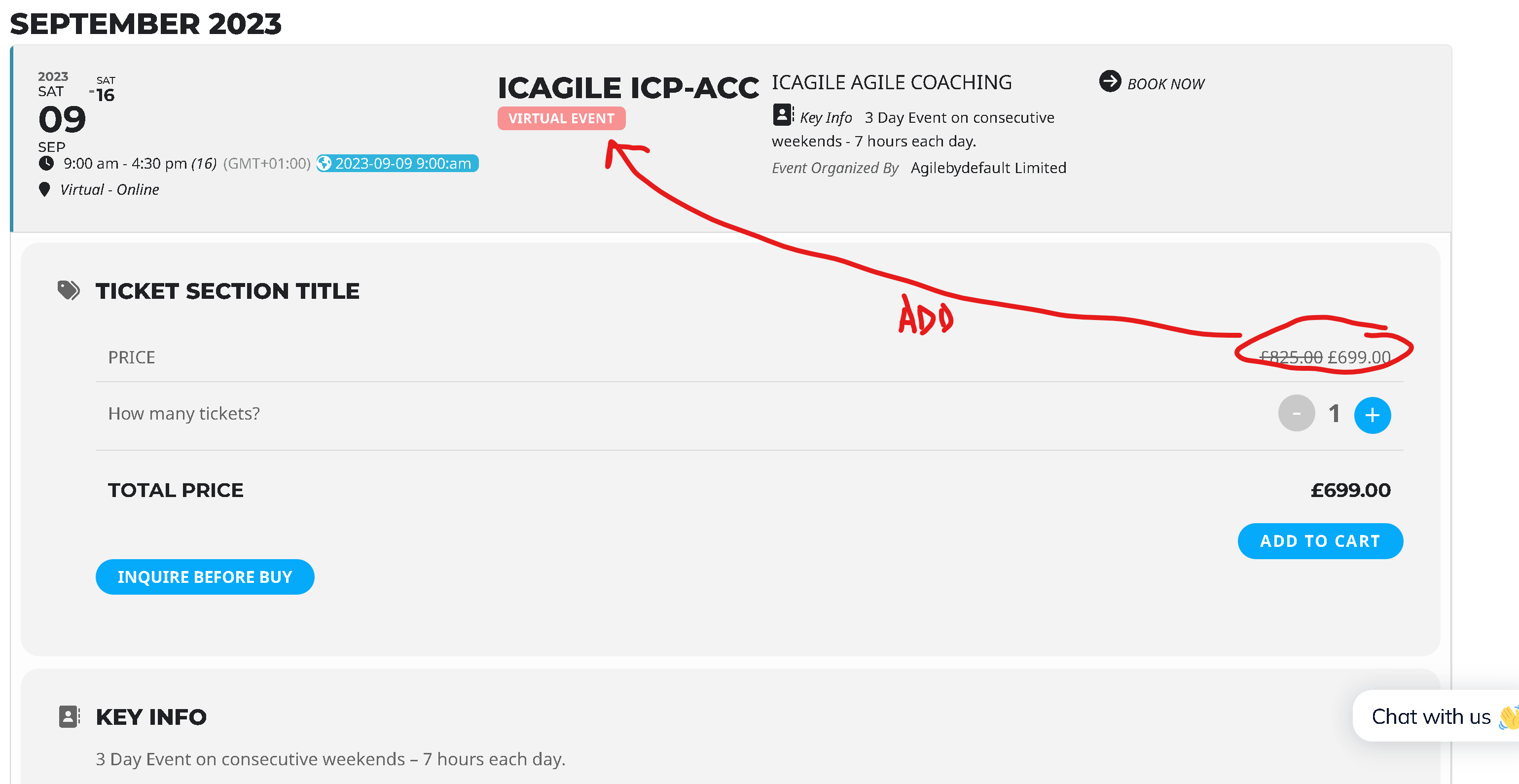
Here what we want is on eventtop to show the course price as it appears when you click eventtop to expand and see the eventcard. This course price i believe is coming from woocommerce product config.
Screenshot to help illustrate what we want is attached.
Now, when we look at this method:
add_filter(‘eventon_eventtop_one’, ‘eventon_insert’, 10, 3);
function eventon_insert($array, $evvals, $passval){
$array[‘custom’]=array(‘eventid’=>$passval[‘eventid’], ‘evvals’=>$evvals);
return$array;
}
Can you help which variable and code we can use to help get the woocommerce product price for the given ticket based on some id like SKU. Also, based on the currency setting, will it return price in the expected currency?
Please help.
Yes~ I set the homepage to do nothing on purpose because the tab nav does not work to expand each event and we are going through an accessibility audit~ and this gets flagged as an error. Thanks so much for addressing this so quickly. When will the next version update be released?
Thank you very much. I was mistakenly Event Card and Event Top. Issue fixed now.