Unfortunately, we don’t provide such services. Please take a look at websites, such as upwork.com.
Archives: Replies
Replies for tickets on suppota
Reply to: tickets(317618)
We are sorry for the delay. We are working on fixing this issue.
As a temporary solution, please downgrade to 4.3.5:
https://helpdeskx.s3.amazonaws.com/wp-content/uploads/2023/06/12031951/eventON4.3.5.zip
Reply to: tickets(317797)
Hello,
EventON 4.4 fixes the issue with Get directions section. Could you update?
To update eventon to latest version: If you are unable to do autoupdate, you can go to codecanyon your account > download and get the latest eventon version as zip file. Then you can go to your website > make sure “Delete eventon settings & data when EventON is uninstalled” is Deslected from eventon settings, delete old eventon, install new one and activate. This link will further explain the process it. Also you can follow us on twitter to get real-time announcements on updates!
Just in case, 4.3.5 is available here:
https://helpdeskx.s3.amazonaws.com/wp-content/uploads/2023/06/12031951/eventON4.3.5.zip
Reply to: tickets(317805)
I just need access to the website with installed Event API, so I can check if everything is fine with it.
Reply to: tickets(317815)
Ah ok, perfect! Sorry but for some reason I completely missed the part with the SVG Support plugin.
Unfortunately, when it comes to issues with third-party plugins we cannot do much about it.
Reply to: tickets(312271)
Hello,
4.4 updated Single Event Page template:
https://pm-eschool.com/wp-admin/plugin-editor.php?file=eventON%2Ftemplates%2Fsingle-ajde_events.php&plugin=eventON%2Feventon.php
Could you update your custom one again? Sorry for the inconvenience.
Reply to: tickets(316673)
On our test server with 4.4 it works correctly:
https://dev2.myeventon.com/test-71/
Just in case, 4.3.5 can be downloaded from here:
https://helpdeskx.s3.amazonaws.com/wp-content/uploads/2023/06/12031951/eventON4.3.5.zip
Reply to: tickets(317650)
Please take a look at this guide:
https://kb.above.im/how-to-moderate-your-jitsi-meeting/
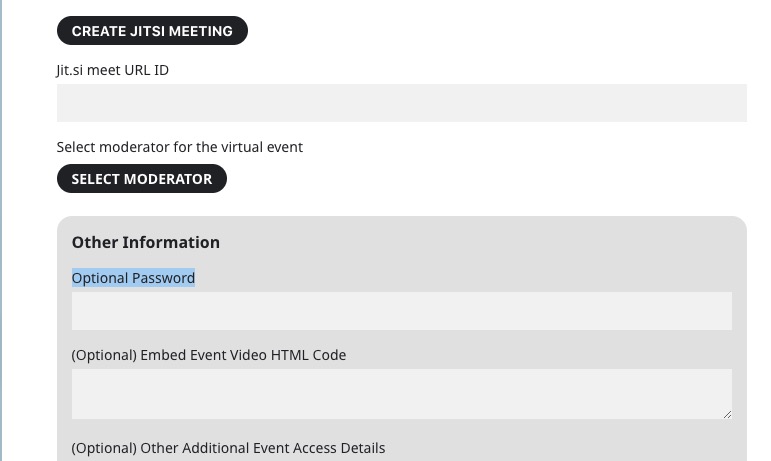
The other thing you can do is to select a password:
Or, if you have RSVP or Tickets add-ons enable these options:
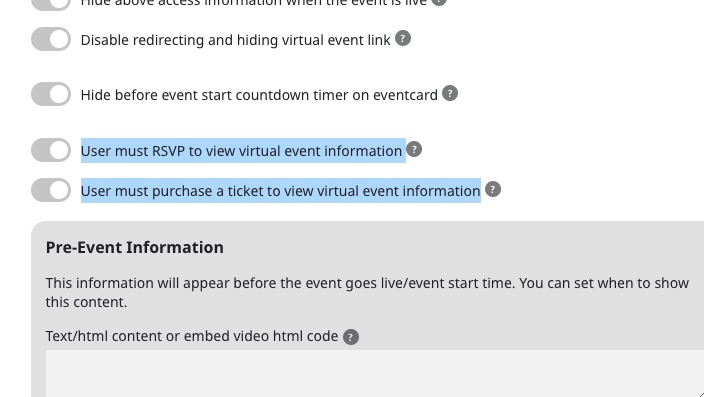
Reply to: tickets(316640)
I can only remove the black top header:
.single-ajde_events #headertop { display: none !important; }
For the rest you need to customize the Single Event Page. It seems that there are multiple designs of the header and you need to take the one where the login button in the menu itself and not in the top.
Reply to: tickets(316322)
We are glad your issue is resolved, if you have any further questions or concerns please create a new ticket.