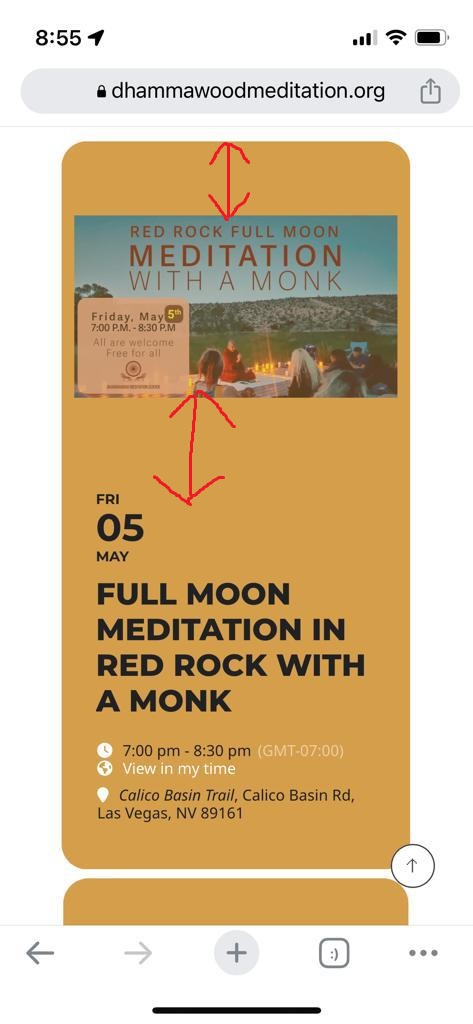
I want to removed the spaces I have pointed out in the screenshot.
Replies for tickets on suppota
I want to removed the spaces I have pointed out in the screenshot.
Hello,
Thank you for your reply. But It doesn’t work.
I have already added CSS codes to EventON.
.ajde_evcal_calendar.boxy.boxstyle1 #evcal_list .eventon_list_event .evcal_desc span.evcal_event_title, .ajde_evcal_calendar.boxy.boxstyle1 #evcal_list .eventon_list_event .evcal_desc span.evcal_event_subtitle { white-space: normal;}
@media screen and (max-width:960px){ .ajde_evcal_calendar.boxy .eventon_list_event.hasbgimg, .ajde_evcal_calendar.boxy.boxstyle1 .evo_boxtop, .ajde_evcal_calendar.boxy.boxstyle2 .evo_boxtop { background-size: contain !important; }}
.ajde_evcal_calendar.boxy.boxstyle1 .evo_boxtop, .ajde_evcal_calendar.boxy.boxstyle2 .evo_boxtop { border-radius: 20px !important; background-size: cover !important; }
Hello,
Please go to https://elearning.survivalskills.vn/wp-admin/admin.php?page=eventon#evcal_004b > add Event Ticket Box to Event Card Layout Designer.
Hello,
Please add this CSS code to EventON > Styles (If you don’t see any change, EventON > Scripts & Styling > turn off Write dynamic styles to header > save settings > turn on Write dynamic styles to header):
.ajde_evcal_calendar.boxy.boxstyle1 .evo_boxtop, .ajde_evcal_calendar.boxy.boxstyle2 .evo_boxtop { border-radius: 20px !important; background-size: cover !important; }
I also want to reduce the space between images and the text.
Could you show us this part on a screenshot?
Artem, Yes, I have that document. What I would like to know is how can I print a ticket for the person who purchased the ticket!
Hello,
Could you please try the instructions mentioned in this documentation to make sure your issue is indeed coming from eventon.
Hello,
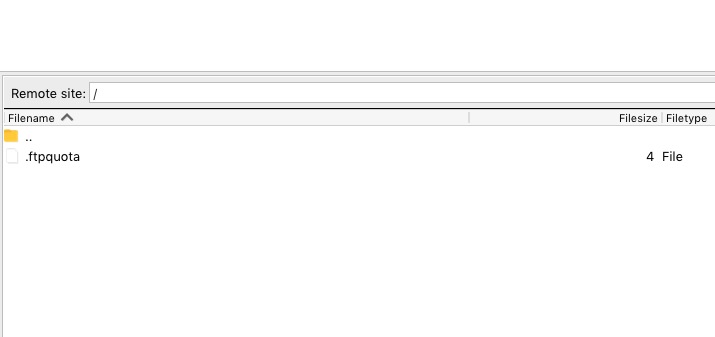
When I connect to the FTP it just shows me this:
Please try completely disable WP_DEBUG:
https://docs.myeventon.com/documentations/how-to-debug-for-php-code-errors/
Please send us wp-admin access to your site as a private message for us to further assist your situation.
Hi Thanks.
But that is what I don´t want. I get a list of events showing all the event details.
I expect to list only the event header without details
Add ux_Val=”2″ but still get all the information as ux_val=”4″
[add_eventon_list number_of_months=”1″ event_count=”5″ hide_so=”yes” filter_hide_indicator=”yes” show_et_ft_img=”no” tiles=”no” hide_month_headers=”yes” hide_mult_occur=”yes” hide_empty_months=”yes” ux_val=”2″]
Hi, sorry to say that the problem is back again. You still have access as per previous credentials. I’d be grateful if you could take a look. Thx