HI, it can’t be cache. I’ve tried from multiple devices and I still get a white screen.
Archives: Replies
Replies for tickets on suppota
Reply to: tickets(314402)
are you using the variations addon or simply editing the product?
Reply to: tickets(314551)
you have 2 shortcodes on the page
what shortcode are you using
Reply to: tickets(295749)
Hello,
Could you try applying this patch to remove the link:
https://helpdeskx.s3.amazonaws.com/wp-content/uploads/2022/11/26155626/Screen-Shot-2022-11-26-at-2.55.27-PM.png
Should work for 4.3.5 as well.
Make sure to make any changes by using FTP connection to your server.
Reply to: tickets(313661)
Ashan,
image_urls they put in the .csv file can be loaded in the browser, but not downloaded by CSV Import:
https://minhemstad.se/fb_images/6tpwtk16k841btt.jpg
Reply to: tickets(314373)
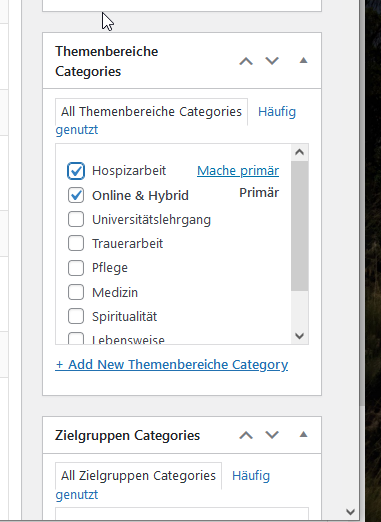
Hello,
if I choose the category I need the color from last, it does still take the color from “online & hybrid” instead of “hospitzarbeit”.
Please check.
Primary and secondary: I can define one category as “primary” and all others are secondary then (see screenshot). Perhaps this is from Theme (Avada). It does not matter, if I have a solution how to set the color of the category needed.
Thx for checking.
Mascha
Reply to: tickets(313661)
Thank you for your messages, I am going to assign this ticket to Ashan and he will be able to take it from here and find you a solution. Please allow some time for him to get back to you, we greatly appreciate your patience and thank you for being a eventon customer! Also please disable any IP blocking on your site if there are any.
Reply to: tickets(313870)
Ok now you should be able to edit this page with Elementor:
https://frontporchmusic.ca/wp-admin/post.php?post=6416&action=elementor
Reply to: tickets(314529)
Hello,
Please go to EventON > Time Settings > Allow universal event time format on eventCard > add
l, j F Y – g:i
Reply to: tickets(314539)
Hello,
Thank you for your great suggestion, at the moment it is not supported. However please create a new ticket and select Feature Request as category so others can vote on your idea and get it moved into development faster.