In order to request a refund, please create a new ticket under Billing & Accounts and be sure to include the order ID for which you need a refund for and the reason for requesting a refund.
Archives: Replies
Replies for tickets on suppota
Reply to: tickets(312409)
Hi again, I finally got back into my account, thank you for resetting my password! I’m not sure why you wouldn’t be able to see all of the events. I did go back and found your account was missing some of the access to some of the parts of the event manager. Could you look again and see if that fixed it. I have a few events in there for April.
Also, I use Total Theme and Elementor Pro. I’ve looked in my elementor settings for Font Awesome, I just can’t see what is blocking the icons from working.
Thank you in advance.
Reply to: tickets(312682)
Ashan,
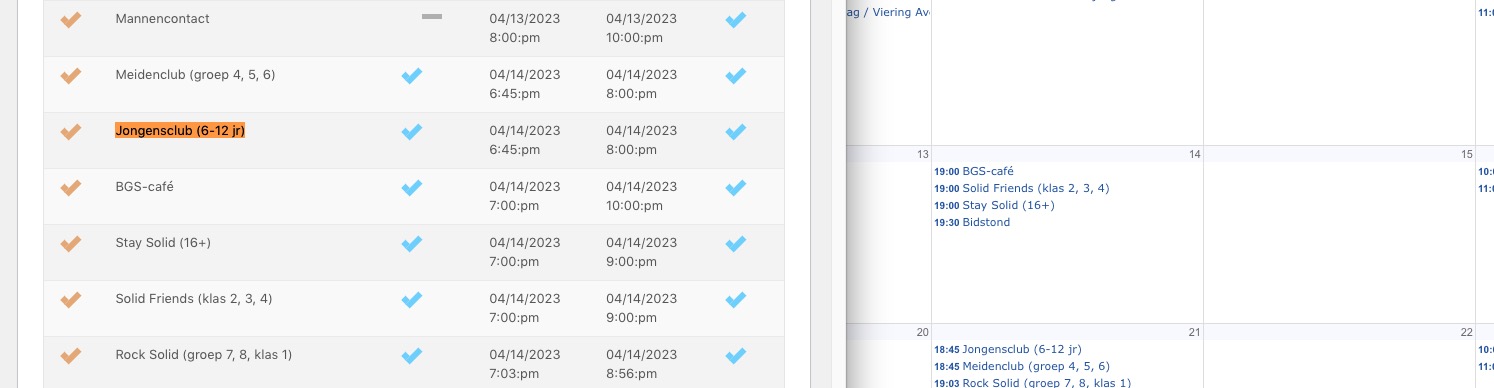
It seems that ICS doesn’t understand rep rules correctly and tried to import events that don’t exist:
Reply to: tickets(312682)
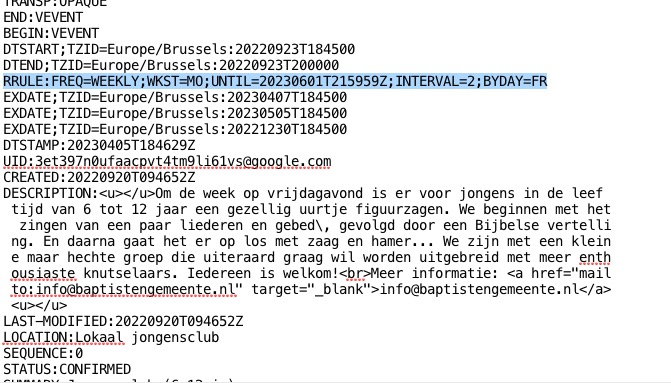
A lot of your events are repeating ones and ICS Import doesn’t support repeating events for now. It seems that it misinterprets this code and think that there is an event on Apr 14th:
I am going to contact Ashan about this. The thing is that since ICS Import doesn’t support repeating events, not sure if there is a solution.
Reply to: tickets(312686)
In order to request a refund, please create a new ticket under Billing & Accounts and be sure to include the order ID for which you need a refund for and the reason for requesting a refund.
Reply to: tickets(312650)
We are glad your issue is resolved, if you have any further questions or concerns please create a new ticket.
If you have a moment, we would greatly appreciate if you could kindly leave us a review at codecanyon! from your account > downloads. Cheers!
Reply to: tickets(278651)
Hi Caro we are doing a new seat map update and in there we are not able to replicate this issue. AKA it works fine.
Are you able to use the alternative method you are using now until we finish things up and release the new seats version?
Reply to: tickets(308797)
I wasn’t getting any response from you and we couldn’t wait any longer so I just deleted all the tables from the database and started with a fresh install. This didn’t happen because of the hack, it happened because of the DB move. It’s very frustrating that we won’t have any of the previous data but we couldn’t wait any longer
Reply to: tickets(312672)
Thank you for the reply. I implemented the CSS and it does hide one of the presenter blocks, but it hides the one that has the presenterw image in it. You can see it in play at the original reference link I sent for this ticket. Thank for the followup!
Reply to: tickets(308797)
I am sorry you feel this is terrible support, we are too human with many things juggling at the same time.
So you are saying this is happening after the DB move, idk if we can do anything about this… Because it was working fine, and this all happened because of the hack and DB move. So its not the software.
You have no events https://nexthype.net/wp-admin/edit.php?post_type=ajde_events Yet you are getting these event variations. I think when you copied over the WC tables the variations were also copied and maybe they were associated with the product IDs. Seems like a huge mess man…
I am really sorry I wish I can help more.. but this seems outside of our scope of support. And I must honor our scope to stay sane. I hope you understand.