when a new update comes on codecanyon it sends an email out to all those who have bought it
Archives: Replies
Replies for tickets on suppota
Reply to: tickets(308930)
hmmmmm, so each of your regional websites have eventon and say action user where they submit events only to their region
AND THEN AUTOMATED those events get sent to the national website
we have a ICS import however that only works on one site from an automation point of view (you could manually import each region if you wanted)
I would look at https://xylusthemes.com/plugins/wp-event-aggregator/
as this can pull multiple sources into your national site from the ICS file
disclaimer- I have not tested the pro version- only the basic version which does work with eventon
the free version is https://wordpress.org/plugins/wp-event-aggregator/ which I would test first with one region and then ask the pro versions support if it can do what you are after (just to be sure before forking out the money) and find out what their refund process is as well
so if what I believe is correct
each region would have their own website and you would activate the ICS download option
in the pro agregator you would copy and paste that ICS file from each region
and it should periodically take events from your regions and add them to the national site
but….. I have not tested it
Reply to: tickets(308425)
I do not believe the calendar can do what you are after in the one shortcode. you can’t show past events, but in the current month only show future events
Possibly have your future events at the top and under that shortcode- show the past events in another shortcode
or you could have an accordian or tab layout (using your page builder) and a future and past shortcode in the 2 tabs (Tab 1= Future events , tab 2 = past events)
personally for page speed of loading I would have past events on a seperate page and only load those future events but that depends on the quality of your server
Reply to: tickets(308730)
The only way I can see this happening without customization (which we do not do anymore)
is to create an event for each membership level- and then you can control what message gets sent to each membership level, you then have different zoom sessions based on their level and you then can also send an email to each individual membership group (so only send to the top teir members (using the built in RSVP emailer)
you would then have to have a seperate calendar shortcode for each membership level so when bronze member logs in they only see the bronze calendar, they can’t see the gold calendar for example- so they can only RSVP to bronze events
If you only want all members to RSVP and non members to not RSVP then thats a simple toggle to make sure only the userroles you select can RSVP (however thats not on an individual event basis thats a deafuat rule for all events
Reply to: tickets(308871)
Also, Litespeed cache’s literature seems to suggest that what precedes or follows this could be the problem.
How do I check this in the code, to see if there is a problem before or after this?
Reply to: tickets(308425)
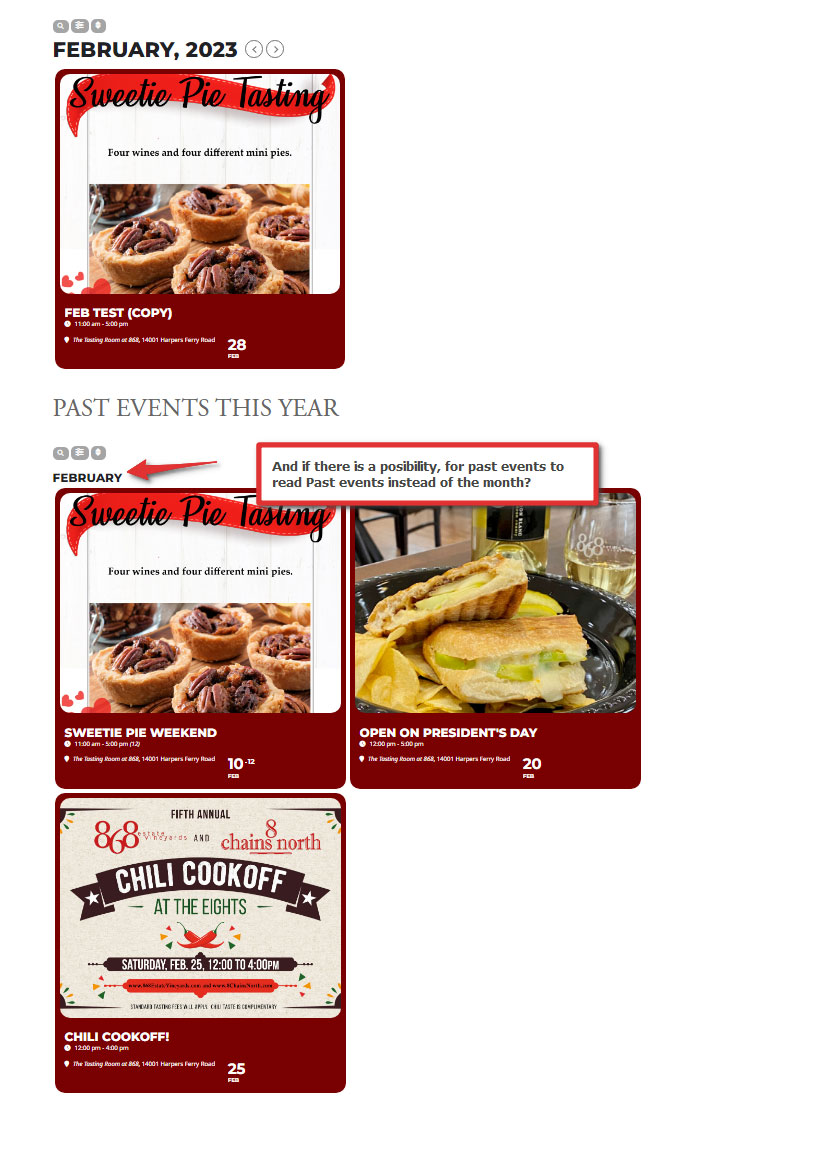
I’m afraid it’s not that simple. This solves only half of the problem. Now i do see only events that past last month when i select last month. That’s great. But for current month now they are all mixed together (past and future). And I want two links. One for upcoming events, and one for past events.
I want them separated like in the image.
Reply to: tickets(308853)
Hi.
Thank you very much for the timely, and very helpful, reply. The layout is not exactly what I was shooting for it’s certainly close enough. For reference, should I ignore the full-width top field and the fourth column field from now on/until patched? (Bug?)
Regarding the filtering, I appreciate any help you/Ashan can provide. It’s not a top priority and I’m no super-rush, whatsoever. I’d rather get it right, than quick!
Thanks again for your help thus far. (Hopefully won’t need to call on you again!)
Travis Dees
Reply to: tickets(308574)
Hi,
Unfortunately, the debug log did not log anything useful/related to the email template. What should I check next?
https://madamcarroll.com/wp-content/debug.log
Thanks!
Reply to: tickets(288393)
Thank you for letting us know. we are working on a new seat map version and testing duplicate function and getting those issues resolved.
Really hoping to get this new version out mid march!!
Reply to: tickets(308730)
I do need the RSVP functionality but I would need the customization to only show a RSVP based on if they’re a paid member so I’m wondering what customization and where in the eventon plugin would need to be customized to only show this custom field for specific logged in users based on a custom field in the backend?