see video below
reminders only go to completed orders- not processing orders
without knowing your set up as we can’t login
I recommend using https://en-au.wordpress.org/plugins/autocomplete-woocommerce-orders/
that after they have paid via paypal or credit card or stripe or any instant payment method it will auto make the order complete thus triggering the emails
if that fails please provide the link , username and password so we can diagnose
I think I created a feature request for this.
A list of organizers. And then link to their individual organizer page.
Currently Im having to manually do this, and its not ideal, and misses an SEO opportunity
did not see the attachment- perhaps copy and paste into a reply
I’ll also assign ashan to this so he can diagnose
and here is a very ugly and crude way to get an event up on your site- its not great but its better than adding no events
“Hi, there is an issue with the reminder plugin. The addon is sending email to the site admin for reminder but not to the customer. We have checked the settings and also we have a email log system in place. So we checked the logs and emails for test purpose as well. Please help
events can be deleted automatically
myeventon>>>>settings toggle on
Auto move events to trash when the event date is past
as for tickets. thats a woocomerce thing and woocomerce would handle that
you could try something like this https://wordpress.org/plugins/post-expirator/
using the above plugin you’d create your event with tickets connected- then you would have to edit the ticket product and set the hide/delete time
I would hide rather than delete for accounting purposes
Thank you for the quick reply. The nginx config isn’t permitting a direct link to the debug.log file, but I was able to download via SFTP. It’s attached.
Also, I missed your note about only uploading here. I emailed this to you over a week ago, but now I understand why you weren’t able to respond 🙂
oh, I think I didn’t mark my reply as private. can I still change from public to private?
oh ok, I put a dot at the end. so here is the correct password:
www.yvonnedicketmueller.de
to login : www.yvonnedicketmueller.de/admin
then:
webgo-admin and Password: Pass99wort
The site is working now, we don’t know whast happened. But EventOn issue persists.
Doy you have any solution?
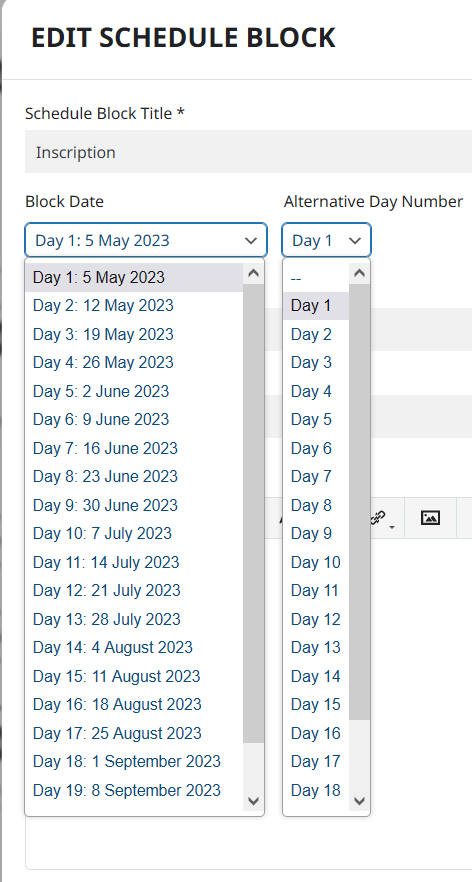
Ok I see.
But Scheduled Block recognizes the reccurent days. Not possible to match the “Day 1” to “Day 1” .
Or as alternative to show on frontend only the “alternative day number” , without the day name ?