Archives: Replies
Replies for tickets on suppota
Reply to: tickets(395758)
The way in which I had to always change around the placement of the JS on page for the Event Accordion to load, meant that when the code was changed, it hard to be hard coded into the plugin itself. This then got overwritten by an update to the plugin – which was super frustrating.
Wasn’t this issues happening because of the theme? It seems that after I tried the default WordPress theme, the issue was fixed?
There were a number of issues with CSS and styling for mobiles that had to be changed on the slideshows, and carousels, in both the main calendar and addons that were purchased, and it had to be hacked together again.
Could you give us a couple of examples? I just checked your other tickets and most issues we couldn’t recreate on our test site.
The side by side calendar and Weekly view was very intermittent when loading, and it only loaded the calendar on a regular basis – you can see in the ticketing threads that I had a tonne of issues with this one.
Are you referring to this ticket:
https://helpdesk.ashanjay.com/ticket/weekly-view-not-showing-cant-figure-out-why/
Please let us know.
Reply to: tickets(396872)
Hello,
You can go to EventON > Search > enable “Include events in default wordpress search results”.
Available Hooks can be found here:
https://docs.myeventon.com/documentations/hooks-actions-filters/
There is no way of searching in EventON shortcode from URLs. However please create a new ticket and select Feature Request as category so others can vote on your idea and get it moved into development faster.
Reply to: tickets(396873)
Closed as duplicate.
Reply to: tickets(396883)
Hello,
Could you elaborate? Are you referring to Tickets add-on?
Reply to: tickets(396866)
Please upload it to
https://wetransfer.com/
and then send us a link.
Reply to: tickets(396905)
Hello,
Please follow the instructions in this documentation to activate debug in your site to see any PHP errors recorded that can provide insight on to whats going on. Please reply with a link to debug.log file. If you are not able to do this please send us FTP access to your site so we can do this for you.
After enabling WP_DEBUG, please upgrade PHP to 8+ to see if any errors appear in debug.log.
Reply to: tickets(359116)
Hello,
1. Please go to EventON > RSVP > enable Disable creating new account for new RSVP user.
2. Could you update RSVP add-on to fix the button?
3. Please update RSVP add-on.
To update eventon addons: You can download latest eventon addons from myeventon > my account. Then you can go to your website, deactivate old addon and install new one and activate then delete the old addon. This link will further explain the process. Also you can follow us on twitter to get real-time announcements on updates!
Reply to: tickets(395780)
Thanks for your help. Though i dont know how to do what you ask?
As mentioned before i thought this would not be a problem to export from old to new site as you had the tools for it. I paid fort csv importer and it doesn’t work.
Not sure why it doesn’t support all fields as it should import everything and not some parts, then it feels like this solution should not be sold at all.
As said before i need a way forward?
The site should have been launched yesterday as it’s finished for launch except the events. I need to have a way forward to be able to launch the site.
Please as this is something i cant do myself nor have the knowledge for.
Reply to: tickets(359116)
Additional:
3:
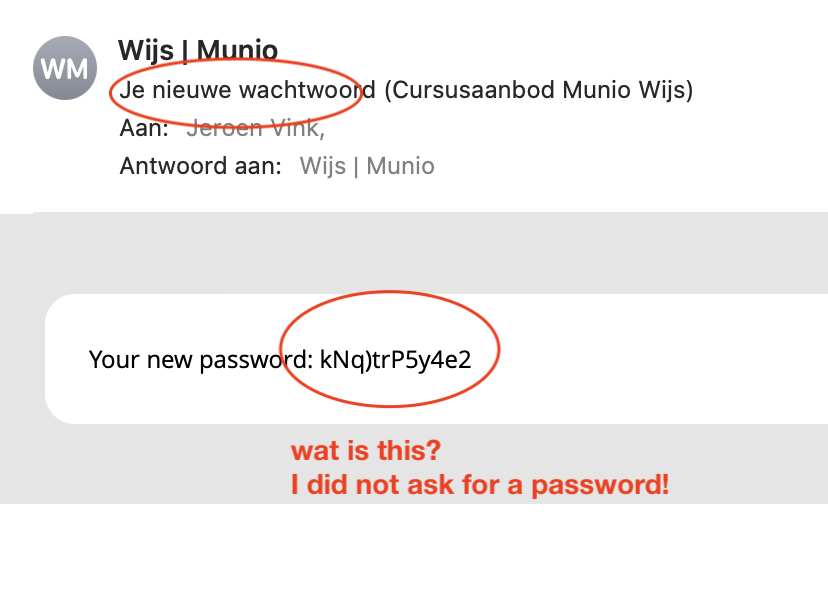
I did not receive the reminder after the event (30 minutes after the event the RSVP plugin should send a reminder filling in a form after the event). It is very frustrating. I also got a very confusing e-mail with a password that I did not ask for. Please help me with these issues. My customer is complaining that his client receive strange and confusing e-mails.
Note: the system can send emails because I got the confirmation email in my mailbox at a test. Only the reminders are not send al all.