Reply to: tickets(304113)
Replies for tickets on suppota
Basically I would like to have setup exactly as per your DEMO
More details:
1. When I click on events photo thumbnails on event card they open in a lightbox. On demo they open in the place where the big picture is.
2. The thumbnails on demo are directly under the big picture without any title. On my site I see the title above the thumbnails.
3. Show as separate gallery option when enabled whilst editing the event switching back off after updating (saving) and does nothing really.
huge smiles. i sure enjoy your service and quick responses. I’ll keep you posted :).
Nope, as I said I rolled back to a previous version of EventON. Currently I have no time to set up a new site to reproduce the bug. But after looking closely at the logs & traces in Developper tools, it seems that it is a problem of positionning of the modal window. It’s not tagged as an “error”, just a “warning”. Advice is to consult this page https://firefox-source-docs.mozilla.org/performance/scroll-linked_effects.html
Well… something is wrong with the display of the modal windows, that’s all I can say.
Thanks anyway, have a nice day
I think that Jetpack might be causing this. Could you try disabling it?
Or disable one of it’s parts that work with images.
Ashan,
Cannot find similar ticket, but I know for sure that one customer already had similar issue.
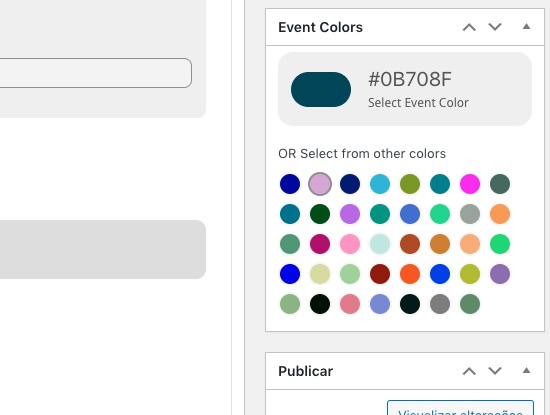
Clicking on “OR Select from other colors” does nothing:
https://passelivre.click/wp-admin/post.php?post=80563&action=edit&classic-editor
Plugin Editor is available.
Hello,
Thank you for your messages, I am going to assign this ticket to Ashan and he will be able to take it from here and find you a solution. Please allow some time for him to get back to you, we greatly appreciate your patience and thank you for being a eventon customer! Also please disable any IP blocking on your site if there are any.
We are sorry for the delay. When you have a new question, please create a new ticket instead of replying an old one.
1. Could you send us link to an event that isn’t visible?
2. Please take a look at Yearly:
https://docs.myeventon.com/documentations/setting-up-repeating-events/
Because of performance, repeating events cannot repeat indefinitely.
3. Did you add the custom code to import additional data:
https://docs.myeventon.com/documentations/import-additional-fields-using-hooks/
4. Depending on where an image is located, sometimes, a server may not allow your server to download it (only humans can download them because of performance). Please make sure that you can download images.
5. Go to EventON > Appearance > try changing colors > save. Now try saving settings the second time (there is an internal cache). If you still don’t see any change, EventON > Scripts & Styling > turn off Write dynamic styles to header > save settings > turn on Write dynamic styles to header.
6. Try going to https://hercal.org/wp-admin/admin.php?page=eventon#eventon_search > enable Enable additional search queries (may not work for all sites).
EventON’s search box seems to be working. Could you tell us which search doesn’t work?
Hi Dave,
I deactivated the duplicator pro plugin – unfortunately that did not solve the issue …