https://baystranger.ca/biminis1975/
https://baystranger.ca/biminis1975/wp-admin/theme-editor.php
I have made some css changes too, tried to add 5 columns in a row. BUT the design is not responsive at all. do you have any solution for this.
My basic need is to show the event posters on my website, with description and timing, it has to work on various screen sizes, wide screen desktop / laptop / low resolution laptop / phone etc.
I dont want the poster to get cut or no visible at any time, it should work as css style contain and responsive too.
tile_height=”500″ is fixed, it does not adjust on smaller screens.
Hi there,
Thanks for your help. The gap is now significantly smaller.
That said, it is still there, and visibly wider than other similar features.
Also, the month name was not removed.
Please let me know how to proceed.
Thanks again!

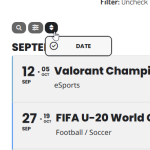
Thanks again for your reply. I added another option to the filter, and it now works as expected. Now users can click, open and close filters after use.
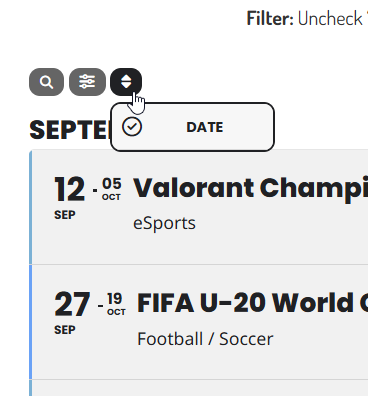
That said, I would still like to remove the third icon, as per the attached image, as it is essentially useless.
Can you please let me know how to remove the icon that points up and down, which sorts the calendar by date (as pointed below)?
Thanks again for your help!

Thank you for this great suggestion. We are going to add this in version 5.0 🙂
THank you for the response, i added a feature request for this option.
2. We are going to add this fix in the next version of EventON.
4. Yes. Just add all customizations to EventON > Styles. It’s the best option.
6. I am going to contact Ashan about this.
7. Please try this CSS code:
.ajde_evcal_calendar.boxy .eventon_list_event .evcal_list_a { flex-direction: row; }
Also try re-arranging EventTop after you added the code.
10. Reviewer add-on allows users to leave reviews directly from Event Card:
https://www.myeventon.com/addons/event-reviewer/
11. With EventON > EventCard > “Feature image display style: Fit entire image resized to min height” it should use the original size and not make it 100% of container. Like this:

Please check and let me know.
It’s strange that the plugin doesn’t allow to use ? in URLs.
I am not familiar with PHP customizations that can be applied to the cache plugin through the code, so cannot help, I am afraid.
Do you see any differences with added code?
That worked!! Thank you for helping me 🙂
We are glad your issue is resolved, if you have any further questions or concerns please create a new ticket.
Hello,
You can just enable guest checkout on WooCommerce:
https://getwpfunnels.com/woocommerce-guest-checkout/
Please also note that Dynamic Pricing add-on allows you to show a certain price for logged/non-logged in users:
https://www.myeventon.com/addons/dynamic-pricing/
Try on
https://dev.myeventon.com/wp-admin/