Since you have Event Lists: Ext among your purchases, you can use it with Date Range enabled:
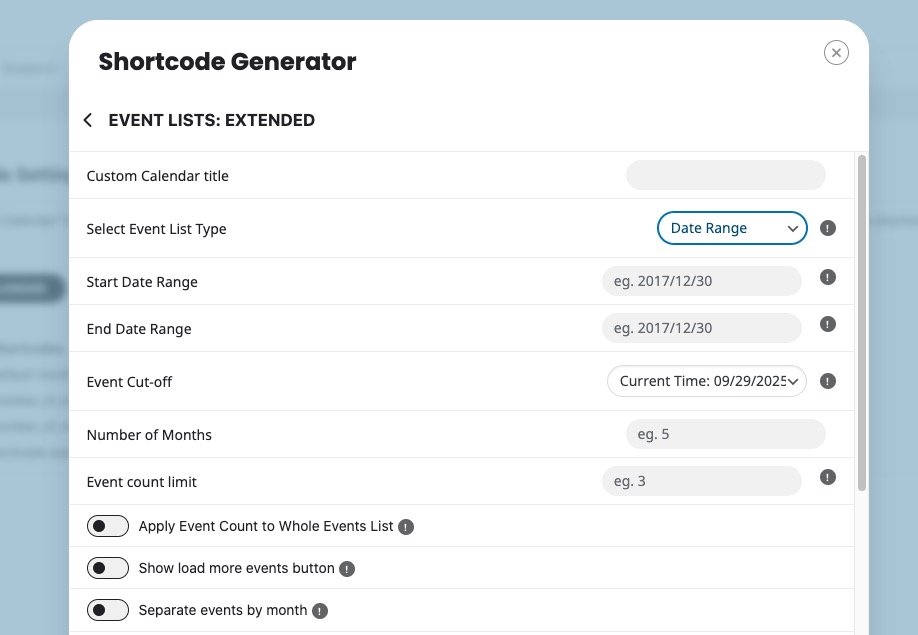
Like this
[add_eventon_el el_type=”dr” start_range=”2025/10/01″ end_range=”2025/12/31″ hide_empty_months=”yes”]
Could you try and let me know?
Replies for tickets on suppota
Since you have Event Lists: Ext among your purchases, you can use it with Date Range enabled:
Like this
[add_eventon_el el_type=”dr” start_range=”2025/10/01″ end_range=”2025/12/31″ hide_empty_months=”yes”]
Could you try and let me know?
Dynamic Pricing add-on can be tested here:
https://dev.myeventon.com/wp-admin/
Hello,
1. For member/non-member you can try using Dynamic Pricing add-on:
https://www.myeventon.com/addons/dynamic-pricing/
You can also use Variations to create different variations for member, groups and so on. However, customers need to select member/non-member manually.
Please also note that Dynamic Pricing functionality isn’t compatible with Variations add-on.
2. Variations add-on’s options can help you with this. Take a look at “Add ticket price options“:
https://docs.myeventon.com/documentations/how-to-setup-and-get-started/
3. Variations as well as options are visible on Cart and Checkout:
https://addons.myeventon.com/events/ticket-variations/
I created this test event for you to check how to configure variations and options according to the guide above:
https://rachelb155.sg-host.com/activites/variations-test/
Hello there my friend sorry for the delay. We have a quite of bit of things we are working on at the moment. Ok so the new version 2.5.7 is working fine on our end let me check on your website and see why it is not.
I am going to install file manager plugin so I can change the codes for actionUser. If something happens, please share FTP access to action User folder via “Access Info” on side bar.
Sorry to be a pain on this ticket, but if this cannot be resolved, just let me know so I can look for another calendar program that will do what I need it to do.
Here’s the link
https://electronicgroove.com/testing123/
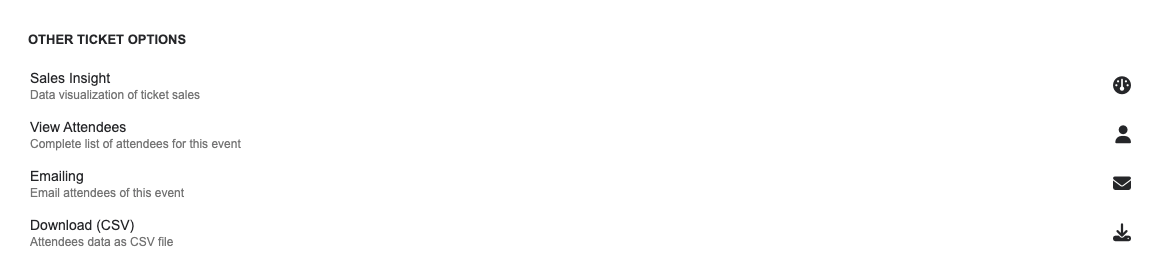
We need that the promoters (our action users) have more visibility and control within their accounts. Specifically, we would like them to see the following options for their events:
Other Ticket Options
Sales Insight (data visualization of ticket sales)
View Attendees (complete list of attendees for this event)
Emailing (email attendees of this event)
Download (CSV) (attendees data as a CSV file)
Could you please let us know if these options can be enabled for promoters, and if not, whether there are add-ons or customizations available to make this possible?
Thank you for your support.
11. Let me elaborate more on this. When you click on the page i have the events, here: https://redball.gr/v2/games-schedule/ , the next event for example appear like that: https://ibb.co/tpH47y4m. Its smaller than its original size but its ok. Next someone click on it and opens the eventcard which shows like that: https://ibb.co/whJVrGKt – The image as you can see its a bit distorted. That happens as its size is 700×500 pixels and open in a larger size, specifically: https://ibb.co/VpxdPnw5 984,02×702,87 pixels. So the idea is to open the image within eventcard in its original size, 700×500. Is that possible? Finally when you click on that image, shows: https://ibb.co/HTqFWDSJ which again its the wrong size, 1000×500. Hope its more clear for you now 🙂
7. So the idea is the following. Go from this that shows now: https://ibb.co/p6KPMCnR to this: https://ibb.co/ZRxy8rFt – Is that possible via css?
Thank you. I am understanding, that it is not possible to show all events from October until December? Or is only one specific month possible?
Background and usage: We have got an early bird club, where subscribers can purchase tickets before the event is officially online. I thought I could manage this by publishing all events but restrict the view of the calendar.
Hello. I have the same question. Is there a way to remove “current month” button?