Hello, Atem. Thank you.
L.
Replies for tickets on suppota
Hello, Atem. Thank you.
L.
Hello, I also need to import events. I’ve read about the CSV importer addon.
I have multilingual events managed with WPML.
How does the addon work in this case with WPML?
Is there anything special I should keep in mind?
Thanks.
Hi Artem,
Thanks for that, I have tested this and it still does not work. Did a full plugin and theme conflict and still can’t get it to work.
Can you please test this on your end to make sure this function is still working? When I test on my end by making the start date an old date, the RSVP box says no Spaces remaining. But when I make the start date a future date, the RSVP options appears.
So I need the RSVP to still display even when the event date has passed!
Thanks
Just released a new version 2.5.8 – changelog
this should have all those missing text strings.
Yes, I did that already as I mentioned.
The point is that 25px size and no gap between buttons by default is not good in terms of UX.
Default style should not be like that.
Hello,
Unfortunately, Event API doesn’t have any access to Tickets add-on data.
JSON data structure can be found here:
https://docs.myeventon.com/documentations/json-data-structure/
We don’t have any functionality that allows you to fetch the data real-time since we have Action User add-on:
https://www.myeventon.com/addons/action-user/
Please also take a look at our Check-ins add-on:
https://www.myeventon.com/addons/check-ins/
Try our products on
https://dev.myeventon.com/wp-admin/
We are using webadmin@asi.sfsu.edu
Perfect!
Hello,
You can use these to show events from certain dates:
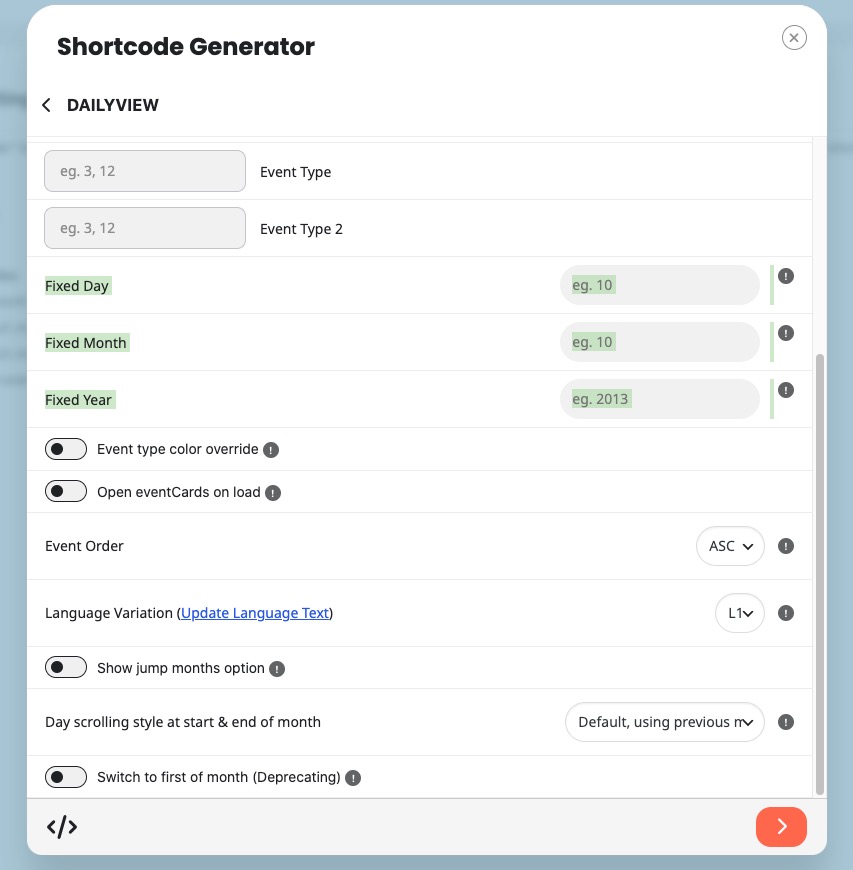
But you cannot show a range as DailyView doesn’t support it.
However, please take a look at Event Type:
https://docs.myeventon.com/documentations/confused-event-type-categories/
https://docs.myeventon.com/documentations/how-to-use-event-types-to-do-more/
You can create a new Event Type and assign it to events you want to show on your DailyView shortcode.
Please check and let me know.
Hello,
Please take a look at CSV Importer:
https://www.myeventon.com/addons/csv-event-importer/
Try on
https://dev.myeventon.com/wp-admin/