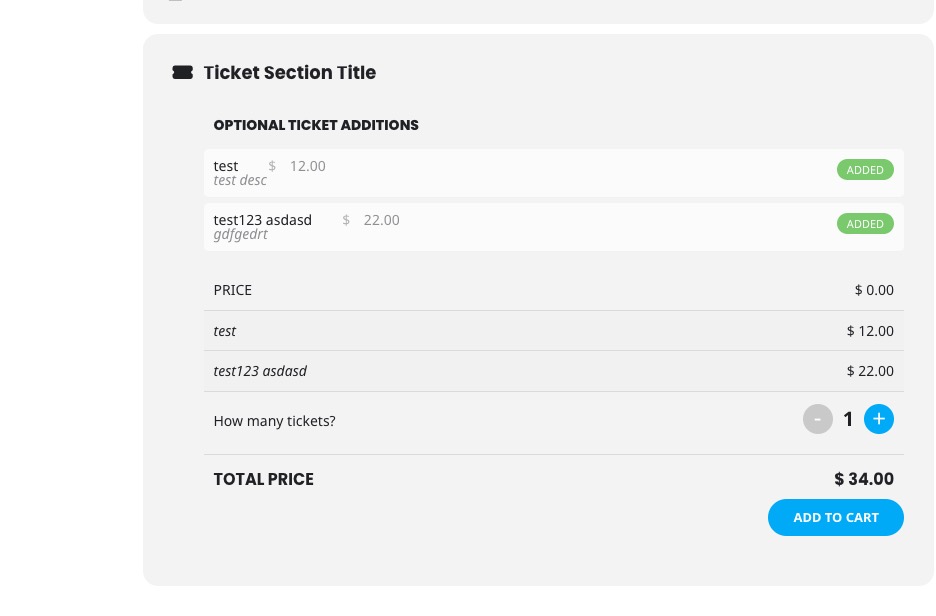
Thank you Toni for this request. We are hoping to have our own app. However we have released updated versions to QR code addon https://www.myeventon.com/addons/qr-code/ — which adds webbased QR scanner which allow scanning without the need of an app.
We also have check-ins addon https://www.myeventon.com/addons/check-ins/ that also allow real time checking in guests.
Hello,
I don’t see the attached screenshot. Could you send it again?
Not sure where prefixes are coming from:
Hey and thank you for the reply,
Here i see it have an ability to attach images, so it just doesn’t appear the editor when you first add a new ticket.
In your reply you saying if i tried to contact you in the forum. No i didn’t, i don’t want the question to be public, i tried send you a message through codecanyon but no reply.
About your answers:
Ty solved almost everything
About images. In Mobile appear perfectly. For a strange reason, it doesn’t appear full image in desktop mode. Is there a code or a setting to appear in desktop mode also full image?
The setting inside is Fit Entire Image, resized box height. I tried Fit entire image, resized to min height or scaled cropped image to fit the full box still but still distorts the popup image. So, i don’t think it’s that setting.
Also some additional questions
5. Do you support css effects on event images, for example appear as B/w and when you mouse over, appear with color
6. There is a text here below the calendar, about Timezone. Where i can find that text color? https://ibb.co/fGnCRh03
7. Below each event on the eventcard is the social button. I noticed that it doesn’t include also the event image when you click on it, for example to share it on facebook. Can this be fixed somehow?
8. Users can download manually the ics for all the events and import them to their calendars. In order this to be achieved automatically and everytime we add new events, to be added to users calendars, i understand we need to use an addon? Do you know if this support also Viber Communities Calendar?
9. To have more calendar styles, i need to buy the related addon for maps?
Thank you in advance again
Thanks Artem. The issue with picking another GMT+00:00 time zone (e.g., Atlantic/St_Helena) is downstream.
Hi
Also, I have a skip to content link that comes up when you use tabbing, it moves to the content on all pages of the site apart from these new event detail pages, across the site we have an ID ‘page-content’ and this is missing from the event pages, is there a template where I can add this in?
https://manninghamhstg.wpenginepowered.com/events/world-heart-day/var/ri-4.l-L1/#page-content
Regards
Amanda
Hi
Thanks, I’ve now got the events opening on a page, but the main event content gets missed by the screen reader, it seems to jump from the main banner to the social icons, missing out event details, time and future event times. Also, the buttons on the main home page that navigate the months just say button.
Example event page: https://manninghamhstg.wpenginepowered.com/events/world-heart-day/var/ri-4.l-L1/
Will you be making more changes in the future to improve this? I’ve not done extensive testing it’s just what I noticed when trying it out.
Regards
Amanda
Hello,
We are working on the update functionality. Please update EventON and the add-on manually by following:
To update eventon to latest version: If you are unable to do autoupdate, you can go to codecanyon your account > download and get the latest eventon version as zip file. Then you can go to your website > make sure “Delete eventon settings & data when EventON is uninstalled” is Deslected from eventon settings, delete old eventon, install new one and activate. This link will further explain the process it. Also you can follow us on twitter to get real-time announcements on updates!
To update eventon addons: You can download latest eventon addons from myeventon > my account. Then you can go to your website, deactivate old addon and install new one and activate then delete the old addon. This link will further explain the process. Also you can follow us on twitter to get real-time announcements on updates!
We are sorry for the delay.
RSVP and Waitlist add-ons newest versions are available for download. Please try updating them to see if the issue continues.
We are sorry for the delay. Ashan will check this ASAP.