I am sorry, the access information you have provided did not work for us. Please check them and post the correct login information as a private message, thank you!
Archives: Replies
Replies for tickets on suppota
Reply to: tickets(289906)
Hello,
1. Since you have Variations add-on, you can create one event that lasts from Start until End time. Then add a new variation for each date by following Adding Variations:
https://docs.myeventon.com/documentations/how-to-setup-and-get-started/
2. You can also enable Repeating Event by following:
https://docs.myeventon.com/documentations/setting-up-repeating-events/
Now also enable Tickets by following
https://docs.myeventon.com/documentations/set-event-tickets/
This way customers can purchase a separate ticket for each repeating date.
Reply to: tickets(290133)
Hello,
Thank you for your messages, I am going to assign this ticket to Ashan and he will be able to take it from here and find you a solution. Please allow some time for him to get back to you, we greatly appreciate your patience and thank you for being a eventon customer!
Reply to: tickets(290056)
Hello,
Please add this CSS code to EventON > Styles (If you don’t see any change, EventON > Scripts & Styling > turn off Write dynamic styles to header > save settings > turn on Write dynamic styles to header):
.eventon_fullcal .evo_fc_day { padding: 12px 0; }
Note that this will change all FullCal calendars.
Reply to: tickets(289831)
Nope – that should be it for this one. Thanks!
Reply to: tickets(283368)
It was wrong before the update. When you add dv_view_style=”oneday” to a shortcode it hides the header, since there is one one day to show.
Please remove dv_view_style=”oneday” to change the calendar behaviour.
Reply to: tickets(289982)
Ashan,
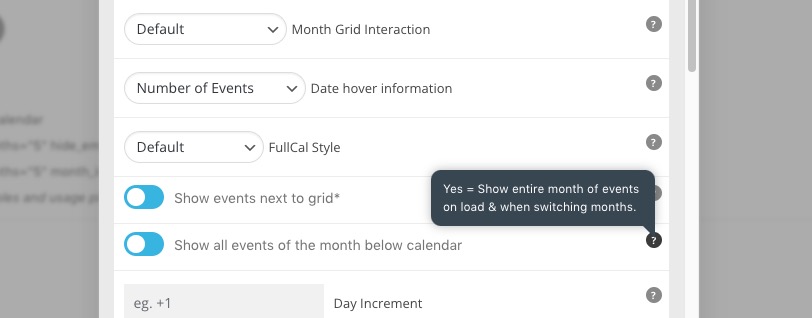
The same on dev2:
https://dev2.myeventon.com/31434-2/
However not sure if “switching” also means when using Jumper:
Reply to: tickets(289982)
Thank you for your messages, I am going to assign this ticket to Ashan and he will be able to take it from here and find you a solution. Please allow some time for him to get back to you, we greatly appreciate your patience and thank you for being a eventon customer! Also please disable any IP blocking on your site if there are any.
Reply to: tickets(290108)
Hello,
Please take a look at
https://www.nationalprintmuseum.ie/wp-admin/options-general.php
Your Date and Time formats are empty.
Reply to: tickets(289619)
We are glad your issue is resolved, if you have any further questions or concerns please create a new ticket.
If you have a moment, we would greatly appreciate if you could kindly leave us a review at codecanyon! from your account > downloads. Cheers!