from my tests on your site the username or and password is not correct
see long and boring video
perhpas try fluent as you have some other plugins that are from fluent on your site
if its failing to connect to server
its either a username/password issue
or there is some security “thing” on your server blocking the connectio
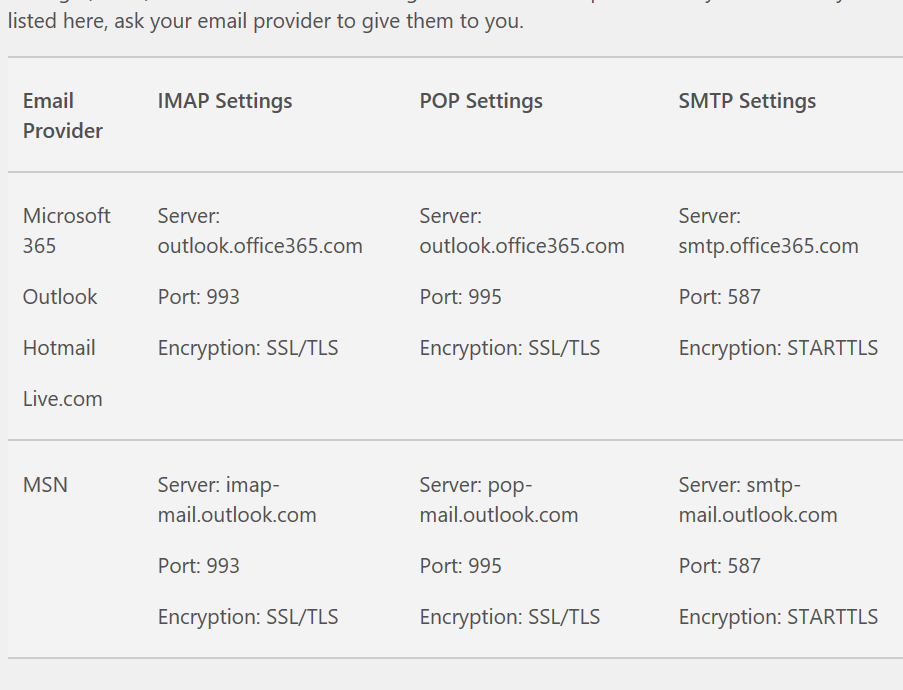
I suspect this has to do with the microsoft authenticator app that came out recently. Since the person that can give me access to change these setting is away – I opted to use my gmail but still getting this error message. Atleast its “less” problems, but what can I do to fix it?
SMTP ERROR: Failed to connect to server: (0)SMTP connect() failed. https://github.com/PHPMailer/PHPMailer/wiki/Troubleshooting
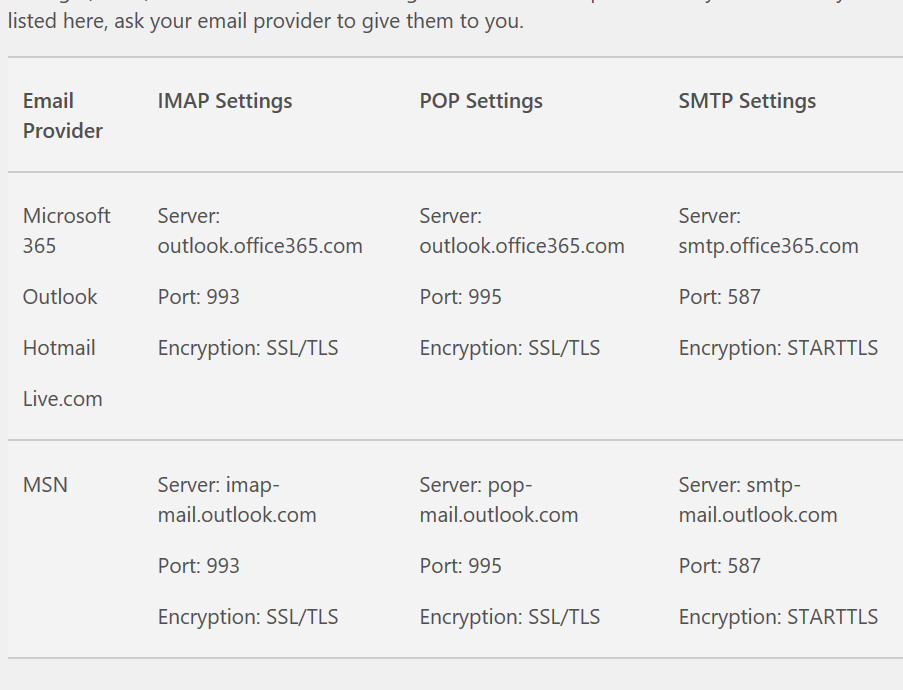
Hi
I have updated it all and the username and password has been updated but I can’t seem to get it working.
I also deleted the fluent SMTP thing to make things easier.
What could I potentially do next? All plugins have been updated now.
HI Carlos,
Please send a direct link as well as a screenshot where the issue is occurring so that we can take a look and give you an accurate solution.
Hi Karl,
Removing the code was supposed to fix the issue, not adding it. I have removed the code for you, but for some reason, the site was not reflecting that. It’s either I am getting a cached version of your site or the code has been added somewhere else.
Anyway, as a temporary solution to counteract the code, I went ahead and added the following to Appearance > Customize > Additional CSS
@media (max-width: 568px){
.evcal_eventcard .evcal_evdata_row .evcal_evdata_cell {
padding-left: 0px;
margin-left: 0 !important;
}}
Hi Beth,
As a temporary solution go to EventON > EventTop > EventTop Main Day block fields and enable Event Day Name.
We are working on fixing this.
Hi Artem,
i don´t know what you meen. I disable the costume code. now you can see the standard date format. I need DD. Month YYYY e.g. 24. August 2022 and try this with the following code in the functions.php:
add_filter('evo_eventtop_dates','fnc_002', 10,3);

function fnc_002($array, $show_start_year, $object){

$start = $object->start;

$end = $object->end;

return array(

'start'=>array(

'year'=> '',

'date'=> $start['n'].'.'.$start['d'],

'month'=>  '',

'time'=>  '',

),

'end'=>array(

'year'=> '',

'date'=> '',

'month'=> '',

'time'=> '',

)

);

}
i *think* i got it working — but with this shortcode:
[add_eventon_el number_of_months=”2″ event_count=”4″ tiles=”yes” tile_count=”4″ tile_bg=”1″ event_count_list=”yes” ]
now, there are only 4 tiles total — and there are no dates missing.
when I did 12 — it gave me 13 tiles, much more than the 4 i wanted.
all we want is 1 row of 4 tiles — showing the 4 most recent upcoming events. not 1, because it’s the end of the month, and not 30 for the whole year. I’m not sure why this is so difficult.
thanks.
actually — it appears it doesn’t.
we just bought this, and I don’t think it does what we asked about.