Hello,
Could you send us screenshots?
On my side:
Replies for tickets on suppota
Hello,
Could you send us screenshots?
On my side:
Hello Artem,
I’m surprised there’s no real way to display all venues in an attractive way, like the archive pages:
I’d like to have a list (or tiles) of each venue since that information already exists- the name, address, thumbnail and all event associated with the venue. Is there some custom code I could use to create a different ”Event Card” that only displays the venue info? This is a photo festival and part of what is so impressive is the fact that there are 90 different spaces participating in the festival so listing them all out would be a really impressive feature!
Thank you for your help on this!
Kelly
The page is down once again today, and it happens every day no matter the settings. Now there’s a critical security issue that hasn’t been addressed for days. I’ll ask some of these questions again, just one last time before I just switch to a different plugin: Are you willing to go in to a staging site and tweak the settings until you get the plugin to work? Live site? You’re really not answering my questions. What is the prefered WP Query method that will allow me to load the amount of events on my site without taking my site down? What are the MINIMUM resources needed for your plugin?
I’m kind of surprised at this point that you still haven’t answered some of my questions. In regards to changing the WP Query method, let me ask this one again:
If I were to create an event today (June 23rd) for an event 6 months away (Dec 23rd) and if I have the WP Query method set at ”created in last 5 months”, it stands to reason that when that event rolls around, it wouldn’t load because it wasn’t created in the last 5 months, correct? What good is that? Is the client possibly limited to only creating events so far out from the date of the event?
I updated the plugin with the new version and removed ux_val from [add_eventon_search] shortcode. But on mobile and mobile only, when a tile is opened and then needs to be closed, you need to hit the ”X” 2-3 times. Is it an issue with the closing ”x” function? I did do a video on my phone of what’s happening, https://limewire.com/d/dAo85#hta2BCjsFR
My customer wants the tiles to open and not slide. But please check the EventOn settings on the website to make sure everything is set up correctly but please don’t change anything.
Just send me the instructions should they need to be changed.
https://regenttheatre.com/wp-login.php
USERNAME: Regent2023
PASSWORD: u2T2z6VNbPX&MCGKFCXKOmDN
Thanks for your help!
the critical security vulnerability has been made known to the public for over 2 days now – any advice?
Hello,
Thank you for your messages!
I am going to escalate this ticket to development to help in here. Please allow us some time to address this, and we truly appreciate your patience. Thank you for being a valued EventON customer!
Hello,
Thank you for your messages!
I am going to escalate this ticket to development to help in here. Please allow us some time to address this, and we truly appreciate your patience. Thank you for being a valued EventON customer!
Please take a look at FullCal add-on:
https://www.myeventon.com/addons/full-cal/
Should look like this
https://dev2.myeventon.com/test-253/
With this shortcode:
[add_eventon_fc hover=”numname” ehover=”event” style=”names”]
Try on
https://dev.myeventon.com/wp-admin/
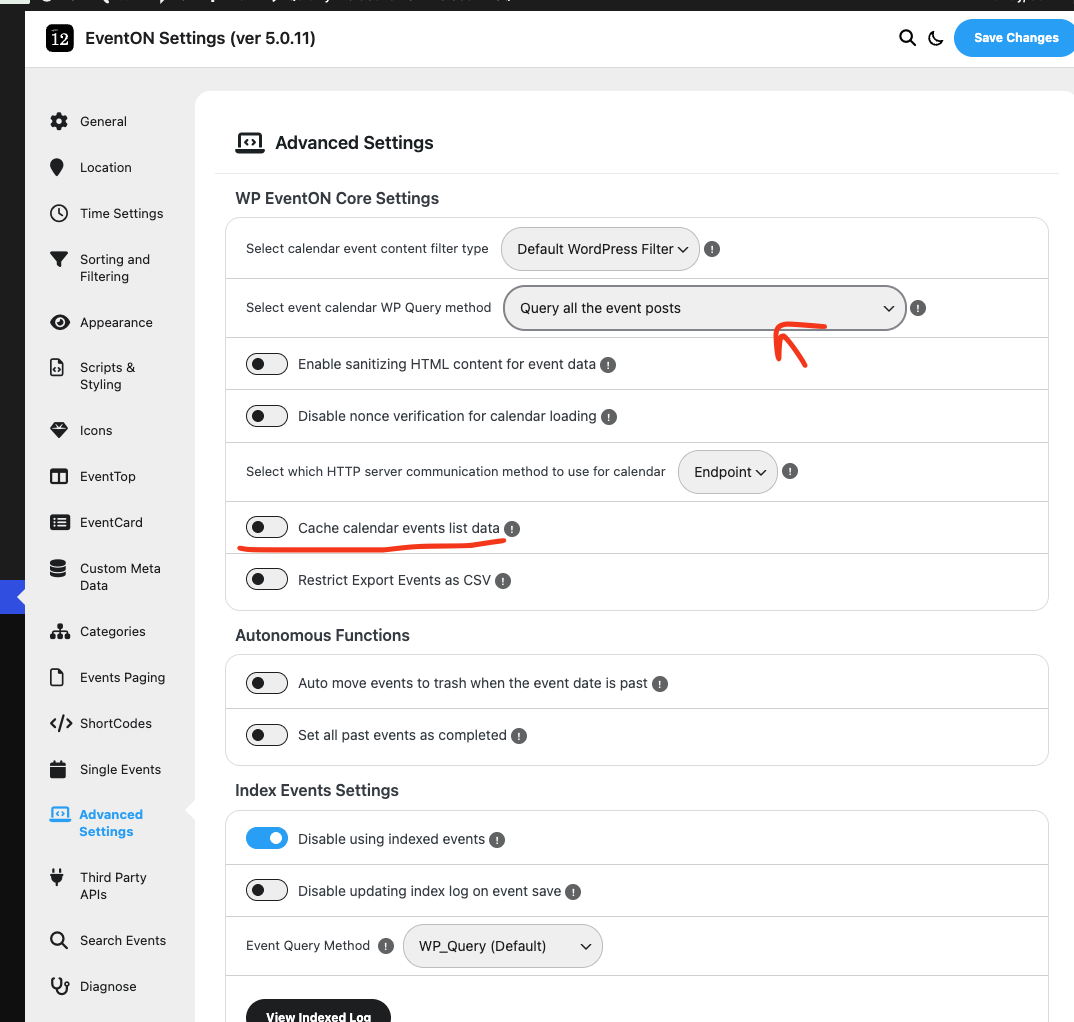
As artem suggested I would also recommend installing a cache plugin that will load content faster from cache. Also try in eventon settings > advanced settings enabling cache and changing WP query method.