Good news we were able to get this added and get it out 🙂
https://docs.myeventon.com/documentations/events-map/
Enjoy!
Replies for tickets on suppota
Good news we were able to get this added and get it out 🙂
https://docs.myeventon.com/documentations/events-map/
Enjoy!
Hello,
1. /schedule is /events? Because if it’s a regular page, then you can simply change the shortcode by using Shortcode Generator:
https://docs.myeventon.com/documentations/shortcode-generator/
However, if /schedule is the default archive page for events, then please follow the first part of:
https://docs.myeventon.com/documentations/how-to-customize-events-archive-page/
What you need to do is to create or find the page assigned and then chang the shortcode.
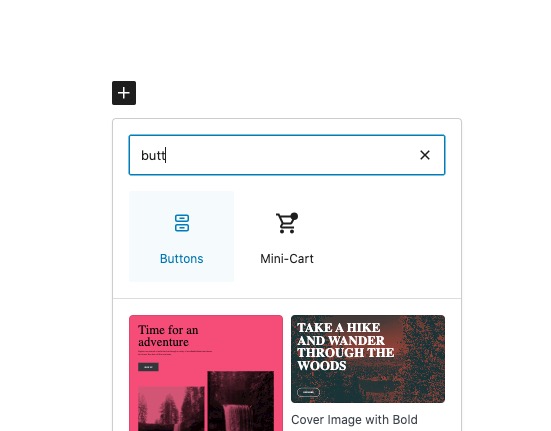
2. The best solution (for performance) is to create two buttons. And then create two pages and assign each to each button:
For example, if you use Gutenberg, then you can use “Buttons” element:
3. Just add exp_so=”yes” to your shortcodes to show the filter bar.
Past events should always be visible (and can be filtered) in FullCal unless you enabled EventON > Time Settings > “Hide past events for default calendar(s)“.
We are glad your issue is resolved, if you have any further questions or concerns please create a new ticket.
Thank you for your great suggestion, at the moment it is not supported. However please create a new ticket and select Feature Request as category so others can vote on your idea and get it moved into development faster.
Hello,
It works on my side.
Please follow the instructions in this documentation to activate debug in your site to see any PHP errors recorded that can provide insight on to whats going on. Please reply with a link to debug.log file. If you are not able to do this please send us FTP access to your site so we can do this for you.
Sorry sorry my apologies, we do have option to show events as lightbox. But I think we need to switch to alternative method as I mention before. Anyways please allow us to get this sorted out. If we are able to get it figured out we will release it in 1.6.1
Glad to hear the new update allowed you to use the maps addon now!
Thank you for the suggestion on events as lightbox. It never had the ability to show events as lightbox because when you click on a marker the infoWindow shows up as well, so if events shows as light box that will cover infowindow. Perhaps a better option could be.
Click on marker > Show infoWindow with number of events and info + button “See events” > this open events in lightbox.
We will address the map height issue in 1.6.1 which we should be able to get it out. We are going to try to incorporate the lightbox events option 🙂
Ah, I see it now. Is there a way to have a different card for the event card and one for the event page?
This whole ticket is private. Please send the login info as a message.