Clients order 131289 is refunded and that subscription is cancelled. Only one subscription active which is the newly transferred one to your client. Please let me know if everything was correctly done?
Archives: Replies
Replies for tickets on suppota
Reply to: tickets(264130)
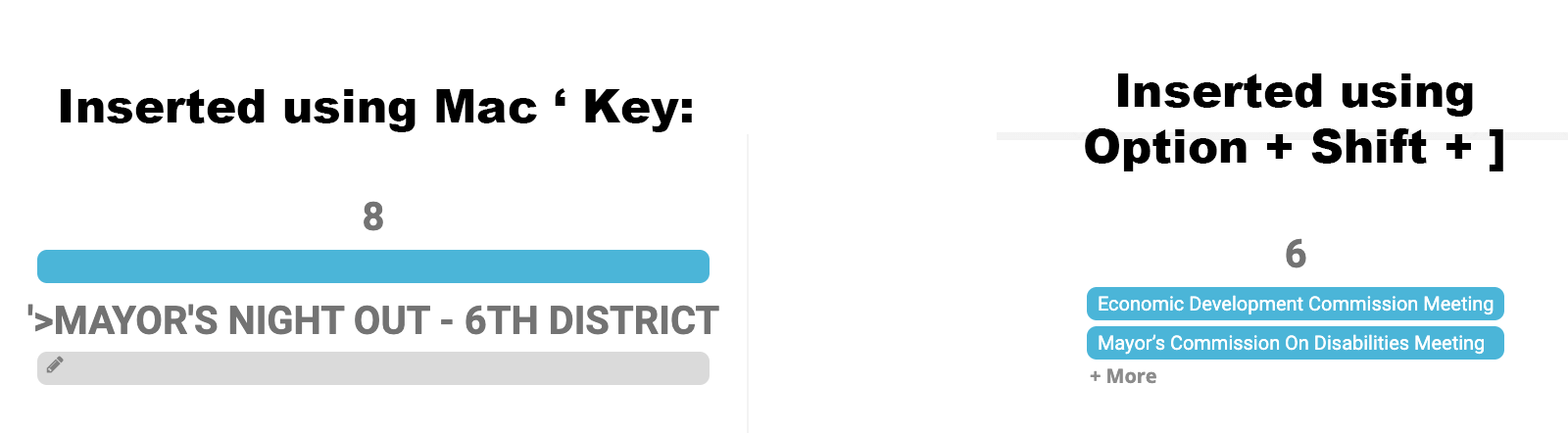
So, it seems to be an issue with the Mac keyboard. See this info: https://www.presentationzen.com/presentationzen/2009/08/apostrophes-and-quotation-marks.html
I inserted the apostrophe with “Option + Shift + ]” and the display is now fixed.
I’ve attached a screenshot showing the difference when using the standard Mac apostrophe key (the one located on the same key as the quote symbol: “) and one using the Option + Shift + ] key combination.
-Ray
Reply to: tickets(258856)
Ok done. the license should now be in your client’s account and should renew auto on 2022- jan 2nd. Please inform this auto renew status to your client to keep seamless transition.
Reply to: tickets(264024)
Hi jennifer, I see what you are asking. SO all those subscriptions have different expiration dates. I could cancel 2 subscriptions and add them all into one. Which one do you want me to add to? I suppose if we add it to the one renewing in 3 days you will lose license time paid for in other 2. We would add them all to the license renewing in 11/11/22 this way you will get free time on others. Let me know.
Reply to: tickets(256231)
Hi david just wanted to update you that we have added this and this feature needs updates to several addons so please allow us time to wrap things up and release the new versions soon 🙂
Reply to: tickets(264130)
Hello,
Would you mind sending a screenshot of how the calendar is appearing? Also, Could you please try the instructions mentioned in this documentation to make sure your issue is indeed coming from eventon. I am not able to replicate this on my end.
Reply to: tickets(264130)
Hello,
Please take a look at https://dev2.myeventon.com/28988-2/. Check Dec 31 > MAYOR’S COMMISSION ON DISABILITIES MEETING.
Please send us wp-admin access to your site as a private message for us to further assist your situation.
Reply to: tickets(264102)
Hi Mike,
I was not able to replicate your issue in my testing site. Could you please try the instructions mentioned in this documentation to make sure your issue is indeed coming from eventon.
Reply to: tickets(264113)
Hi Norbert,
You can choose what displays by going to EventON > Settings > EventTop
Reply to: tickets(264115)
Hi Dave,
We are glad your issue is resolved, if you have any further questions or concerns please feel free to create a new ticket.