Hi Artem,
Thank you for your support. I’ve applied a temporary fix on my end, and the issue is currently resolved. However, a more permanent solution may still be needed.
Replies for tickets on suppota
Hi Artem,
Thank you for your support. I’ve applied a temporary fix on my end, and the issue is currently resolved. However, a more permanent solution may still be needed.
Hello,
You can do tests on our staging website https://wordpress-1348829-5701931.cloudwaysapps.com/
Hello
Here’s a clone of the website. If you click on an event the EventCard is grey and the font is Poppins instead of Oswald. The same on the gridview.
https://eventon.diexperten.ch/
This is the site before the update of Eventon:
https://grabenhalle.diexperten.ch/
Hi Artem
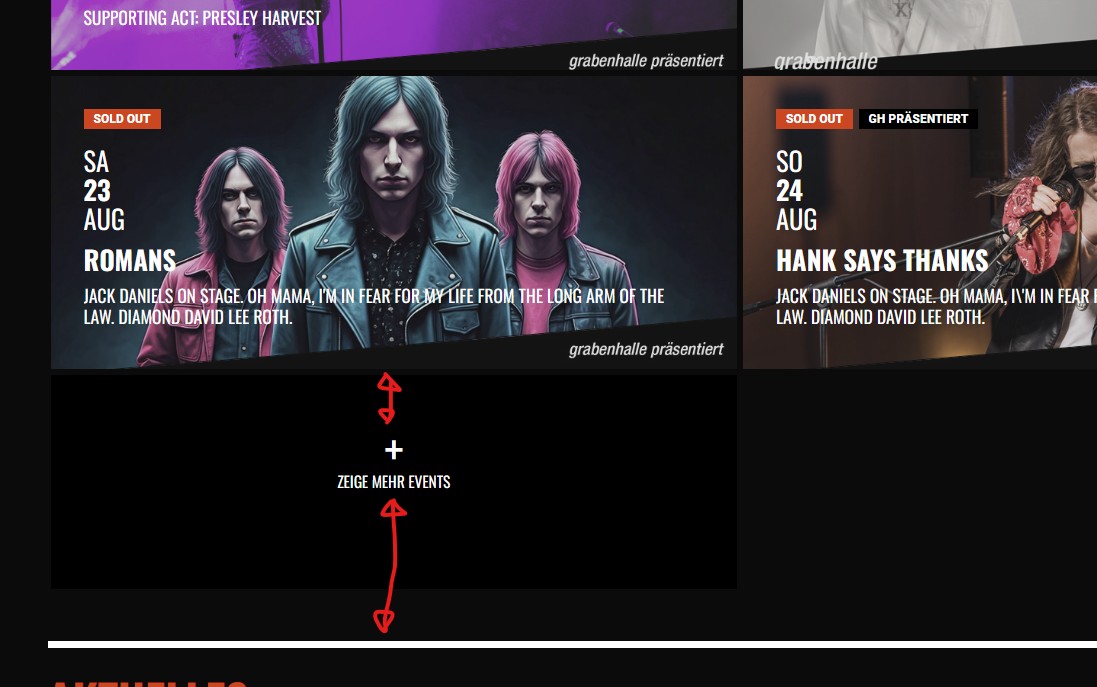
Thank you very much. Is there a way making the gaps on top and bottom of the load more button smaller? All I was able to, was making it black but I couldn’t change the size of the button. Sorry, for bothering you again. Thank you very much in advance. Kind Regards, Oliver
okay, I have changed it as the slider looks like it is conflicting with the theme. I have changed it over to the Weekly View – and it all works.
If possible, if I can’t get one of my team to fix the theme compatibility, can I get a refund on the EventOn Slider plugin? I will get in touch with you within 24hrs as we have to work it all out.
Thanks for looking into it for me – much appreciated.
Thank you very much. I will definitely be back should I need any of your plug-ins. They seem great! (just was already elbows deep in working with The Event Calendar).
Hello,
Could you try manually clearing your browser cache?
Are you having the same issue on our test site:
https://dev2.myeventon.com/events/rsvp-3/
Please go to wp-admin > Plugins > Plugin Editor > select EventON > now find the file and then the line and make the change. I can also add it for you. But please send us FTP access to your site from “Access Info” box on right side menu.
Hello,
Can we do some tests according to this guide:
https://woocommerce.com/document/stripe/customer-experience/testing/
Ashan,
The same on dev2:
https://dev2.myeventon.com/events/var-2/
“Ticket: Var July 31, 2025 – July 31, 2025 ” is also being added to Cart.