Thanks for your help. Though i dont know how to do what you ask?
As mentioned before i thought this would not be a problem to export from old to new site as you had the tools for it. I paid fort csv importer and it doesn’t work.
Not sure why it doesn’t support all fields as it should import everything and not some parts, then it feels like this solution should not be sold at all.
As said before i need a way forward?
The site should have been launched yesterday as it’s finished for launch except the events. I need to have a way forward to be able to launch the site.
Please as this is something i cant do myself nor have the knowledge for.
Additional:
3:
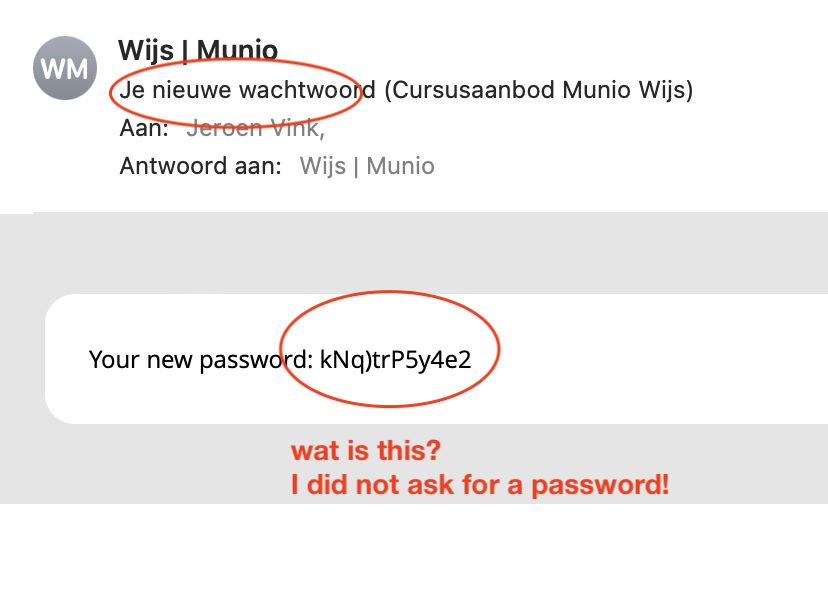
I did not receive the reminder after the event (30 minutes after the event the RSVP plugin should send a reminder filling in a form after the event). It is very frustrating. I also got a very confusing e-mail with a password that I did not ask for. Please help me with these issues. My customer is complaining that his client receive strange and confusing e-mails.
Note: the system can send emails because I got the confirmation email in my mailbox at a test. Only the reminders are not send al all.
Ty for the reply,
4. Added them there, nice 🙂
7. I added that nice, is there a way to achieve via css also this result: https://ibb.co/r2Rkf7c7 – So bring the date only, on top of the image, on the upper right side of it.
11. The logic on this question, is how i can control the slidein window width. I did what you proposed and the view now is this: https://ibb.co/39dK1Kvc and produce the background on left / right. If the whole window was lets says 700 pixels width instead of what is now 1200px then won’t need to resize the image 🙂 I don’t know if that’s possible
Great support guys!
Hello, a year ago I asked why passwords are mentioned in the confirmation e-mail.
1:
There would be a fix in the next release but in an other website with the rsvp plugin still unnecessary information about passwords is being send. How do I remove the text about password info in the mail?
2:
There is also an ‘add’ button in the confirmation e-mail that links to a white page on my site. How do I remove this confusion button?
Thanks for your reply and taking this serious. We will appriciate the effort, and we will wait patiently so you can take your time. In the meantime, we will adjust the ticket stock manually.
Kind regards,
Frank
I’ve updated to 2.4.20.
The event that had the issue is here:
https://davidlynas.com/sabsa-training/sabsa-foundation/
Dec 01 – 05
https://docs.google.com/spreadsheets/d/1oCPg4Mb7OgzWD2UjB7flKGbCcbkRYAQLmtEA_QtQiBo/edit?usp=sharing
yes – I would like to – but .csv file upload is not allowed in this chat
Hi sorry, I have been OS for work and wasn’t at the desk.
Okay, there are way too many items that needed to be changed around to fit in with the theme. The way in which I had to always change around the placement of the JS on page for the Event Accordion to load, meant that when the code was changed, it hard to be hard coded into the plugin itself. This then got overwritten by an update to the plugin – which was super frustrating.
There were a number of issues with CSS and styling for mobiles that had to be changed on the slideshows, and carousels, in both the main calendar and addons that were purchased, and it had to be hacked together again.
The side by side calendar and Weekly view was very intermittent when loading, and it only loaded the calendar on a regular basis – you can see in the ticketing threads that I had a tonne of issues with this one.
I do think the plugin is a great plugin, but it isn’t as compatible as what the sales page says, without a heap of knowledge on JS, CSS trouble shooting and error fixing.
Any refund would be appreciated.
Thank you for letting us know. we can also replicate this issue. We are in the middle of a big update and hoping to get this done soon. Really hoping next week release. We will be including the fix in there.
We very much appreciate your patience!