Hi Michael,
I have added the custom CSS code below to myEventON > Styles and the icons are showing now
.evo_metarow_socialmedia a.evo_ss i { font-family: evo_fontawesomes,evo_fontawesome,evo_fontawesomeb !important; }
Replies for tickets on suppota
Hi Michael,
I have added the custom CSS code below to myEventON > Styles and the icons are showing now
.evo_metarow_socialmedia a.evo_ss i { font-family: evo_fontawesomes,evo_fontawesome,evo_fontawesomeb !important; }
where should I do this?
thx
Please give me an update on this….!
It has been 19 days since I wrote in about this.. What is the status please?
theres only one shortcode do to with eventon so yes add it to the calendar shortcode
[add_eventon_list number_of_months=”5″ cal_id=”Workshops” hide_empty_months=”yes” event_type=”298,” hide_so=”yes”]
you’ll have to redo each ” if you copy and paste from here
but now you want to change the icon to white is this correct?
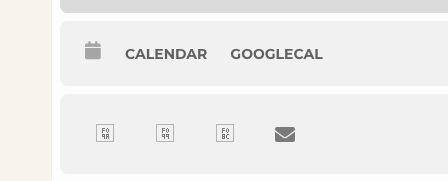
Correction / typo in my initial statement.
Some icons work, others don’t.
Add to what short code? The calendar short code?
This is the shortcode we are using for this element”
[add_eventon_list number_of_months=”5″ cal_id=”Workshops” hide_empty_months=”yes” event_type=”298,”]
I would prefer changing the color to #ffffff (white) can I add css, instead? What is the selector?
Thank you
Added the code to https://portal.royallepagesignature.com/wp-admin/customize.php?return=%2Fwp-admin%2F > Additional CSS. Please check and let us know.
We are glad your issue is resolved, if you have any further questions or concerns please create a new ticket.
If you have a moment, we would greatly appreciate if you could kindly leave us a review at codecanyon! from your account > downloads. Cheers!
Hello,
Please send us wp-admin access to your site as a private message for us to further assist your situation.
Could you also try https://docs.myeventon.com/documentations/single-events-page-not-working-404-error/?