Perfect! Please keep us updated.
Archives: Replies
Replies for tickets on suppota
Reply to: tickets(395177)
I also added this code, so it should work now:
@media (max-width: 480px) { .color .eventon_events_list .eventon_list_event .evcal_list_a { flex-direction: row !important; } }
Please check and let me know.
Reply to: tickets(395276)
Hello,
If you go to wp-admin > Events > Event Speaker > click on View, you should be able to see single Speaker page.
Could you check and let me know?
Reply to: tickets(395177)
Hello, thank you so much for your help. Now it looks exactly as I wanted it to. Great. The only thing I want to change is the portrait view of the calendar on my smartphone. The blue blocks are still very tall here. If you can tell me how to change that, I would be very grateful. Best regards, Markus
Reply to: tickets(395236)
Dear EventON Support Team,
We have made the changes you suggested in the wp-config.php file so that debug mode is now active and errors will be logged in the debug.log file. We will wait for the issue to occur again in order to send you that file and provide the necessary information.
Regarding your question, we confirm that WP Rocket does allow excluding specific URLs from caching. We have already tested the exclusion of /wp-admin/admin-ajax.php and we can add other exclusions if required.
We will send you the debug.log as soon as we have it available.
Thank you very much for your help and support.
Kind regards,
Reply to: tickets(395181)
Hello Ashan, Artem, thanks so much for this. Looks fine now. Thanks for pointing out the actual setting that accomplishes this.
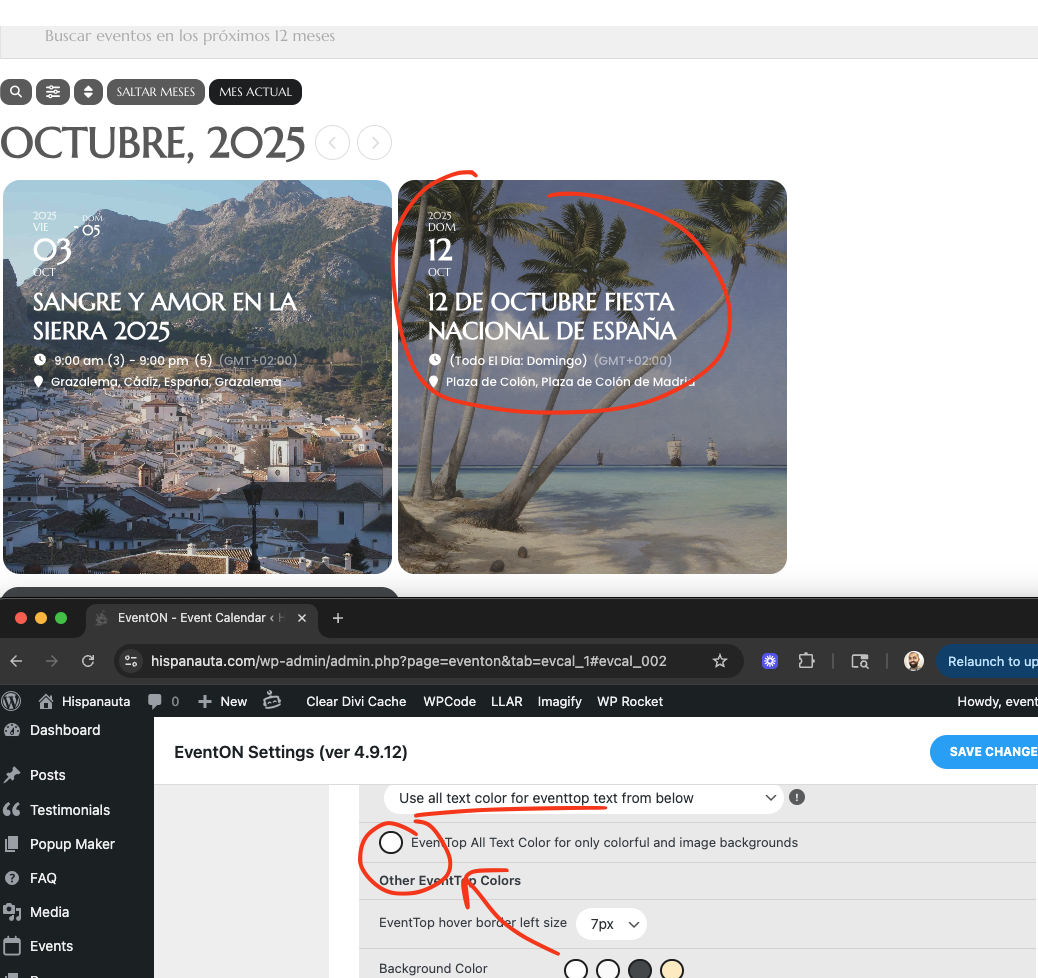
We’re getting closer: one last thing please if I may! Now the font in the cards that appear BELOW my Full Call https://hispanauta.com/agenda-vista-almanaque when you click on a date that has events in it is white, so it cannot be read properly over the light gray background. I guess that particular setting you showed me that turns “EventTop All Text Color for only colorful and image backgrounds” to white affects ALL cards appearing on both calendars… Is there a specific CSS snippet that can be applied ONLY to these tiles on this calendar type?
Again, go to October 3 to see the test events and see the cards that pop up.
Thanks a ton!
Reply to: tickets(395112)
It’s on a client site, so I am not able to give permission. Could the issue be that I renamed the Event type #1 to “Classes”?
Reply to: tickets(395181)
I made the color to appear white now. by chaning the appearance setting color to white.
For the event popup to be able to show text color visible, I recommend you set darker color as the event color from event edit page.
Reply to: tickets(395170)
this issue is from 4.9.9 and the latest version is newer than that. We have addressed that issue long time ago. They have not updated their database with the fixed version.
You can ignore this issue and if you have a chance please reach out to them and ask them to update their database. — Which we have also done, with no result.
Reply to: tickets(395180)
1. The search box inside the calendar only searches in the current selected month. The way you added it to the calendar is correct, you just need to use Search Box outside of the calendar if you want to allow users to search all months.
2. Please go to EventON > Search Events > disable Enable Search on all calendars by default. Now make sure that your shortcode doesn’t have search=”yes” added.
3. Thank you for your great suggestion, at the moment it is not supported. However please create a new ticket and select Feature Request as category so others can vote on your idea and get it moved into development faster.