I’ve noticed that both English and Arabic versions are displaying in RTL (right-to-left), whereas only Arabic should be RTL. I’ve just disabled the “Enable RTL for all EventON calendars” setting to correct this.
This is not supported by EventON, I am afraid. “EventON > Enable RTL (right-to-left all eventon calendars)” works on all calendars and cannot be enabled on each individual calendar.
Can we have access to wp-admin, so I can create demo for you?
Please make sure to follow this guide on how to enable WPML for taxonomies:
https://wpml.org/documentation/getting-started-guide/translating-post-categories-and-custom-taxonomies/#:~:text=Go%20to%20WPML%20%E2%86%92%20Settings%20and%20scroll%20down%20to%20the,translated%20slugs%20for%20each%20language.
Look for post_type=ajde_events.
Then create an event for each translation and then follow the guide to enable WPML on each calendar.
Please try this code to change EventTop’s header:
.eventon_single_event.immersive .eventon_list_event .evcal_list_a { padding: 20px; }
Your theme has it’s own scrollbar functionality that completely replaces the default one. Please contact the theme developers and ask what can be done for EventON to use the default scrollbar.
Hello,
Your current shortcode is basic Event Lists.
Please replace it this shortcode:
[add_eventon_el number_of_months=”2″ event_count_list=”yes” event_count=”5″ show_limit=”yes” show_limit_ajax=”yes” hide_empty_months=”yes” tiles=”yes” tile_count=”3″ tile_bg=”1″ hide_so=”yes”]
https://pastebin.com/ue2C0uug
You can set any events to show by changing event_count.
Apologies for the delay in response. Any chance you can reach out to yoast and seek help as to how to allow support for URLs with parameters appended to it? — We are not too familiar with the yoast settings.
Yes if you have the order IDs for the licenses purchased from old employee, we can transfer those into another account and move the payment details as well.
please reply back with following:
1. Your account email address (the email address used to purchase addons)
2. Order ID(s) and name(s) of EventON Addons under old employee account that you would like to transfer. IMPORTANT: these licenses must be active and NOT cancelled.
3. Your email address associated with myeventon.com account where addons were purchased from.
4. Order ID(s) of the addons you purchased (to support license transfer).
Sorry for the delay in getting back .Kindly use coupon code EVO20T at the checkout and that will get you 20% discount on all addons in the checkout for the first year.
Sorry for delay in getting back. Kindly update to the latest version of Event Maps addon 1.6.1 — should resolve this.
With latest versions of tickets and variations are you still experiencing the same issues?
Dav, how does your event organizers see the participants list on frontend? Are you using actionUser event manager or how exactly are they seeing this?
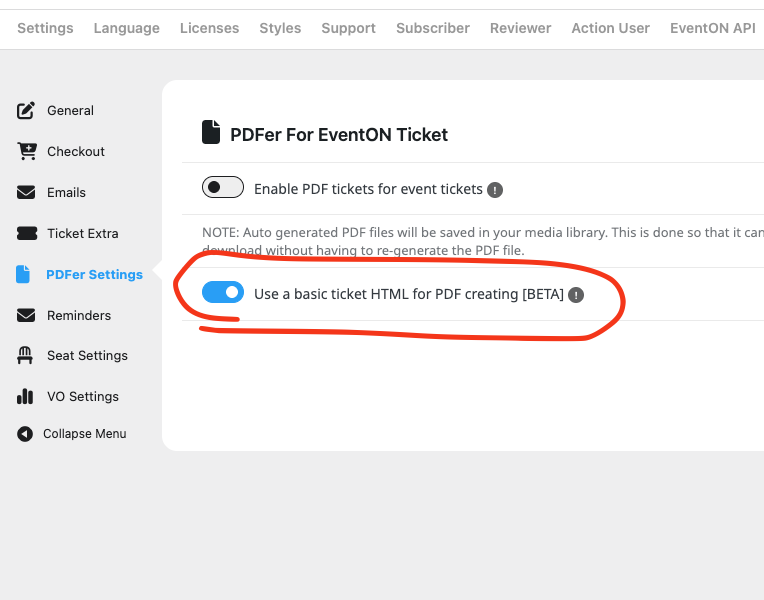
Just following up, the latest version of PDFer addon has an option to use basic ticket HTML to generate PDF which will stop that error from coming up. If you get a chance please give it a try and see if that will work for you without errors.
Kind Regards!