Hello,
Please go to Edit Event > Tickets > Config > enable “Place ticket on out of stock”:
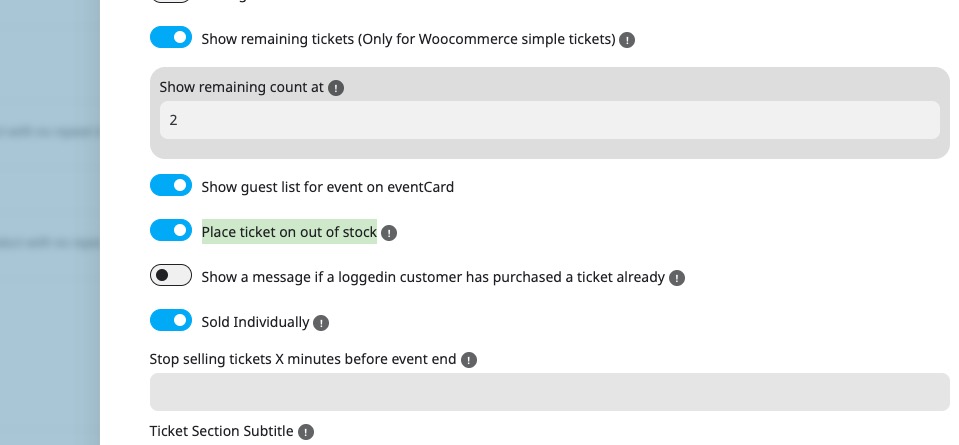
Also go to EventON > EventTop > make sure that “Tags” is added.
Replies for tickets on suppota
Hello,
Please go to Edit Event > Tickets > Config > enable “Place ticket on out of stock”:
Also go to EventON > EventTop > make sure that “Tags” is added.
Google searches through the calendar or sitemap. It doesn’t go to each individual event. And each calendar has schema data that contains correct events’ URLs.
Do you provide Google with updated sitemap or how does it get new events?
Please also note that I still cannot recreate the issue on your website.
The previous debug.log file was more than 3GB. I renamed it, so could you recreate the issue again so it can be written into the new file.
Could you give us the working FTP access so I can update everything and then enable WP_DEBUG to figure out why the calendar isn’t working?
Ah ok. I understand you. But i have this problem.
If i add new event, i get a URL of this new event. like this: https://perfect-meeting.de/event-page/euroguss-2026/
This event is also in englisch on this site: https://perfect-meeting.de/event-page/euroguss-2026/?lang=en
but not the translations how ORT, ZEIT, KALENDER, ANFRAGE FÜR HOTELZIMMER usw.
thats my problem, because Google to this site in his index for the keyword (euroguss 2026)
If a user speaks English, the translation is incorrect.
Hello,
1. Event Map doesn’t have such option available, only Main Calendar and Event Lists have. You can find it in Shortcode Generator.
Please also try Troubleshooting Mode from 2.
2. Could you try Troubleshooting Mode:
https://2fluegel.de/wp-admin/site-health.php?tab=troubleshoot
Please enable it and then check if the same issue reappears when no plugins are enabled + default WordPress theme.
Hello,
Please take a look at CSV Import:
https://www.myeventon.com/addons/csv-event-importer/
It allows you to import events with assigned locations. But unassigned locations will no be imported.
Try on https://dev.myeventon.com/wp-admin/
About WP All Export Pro. Did you check this guide on how to export posts with taxonomies:
https://www.wpallimport.com/documentation/export-posts-with-their-taxonomies/#:~:text=To%20export%20your%20WordPress%20data,tags%20attached%20to%20your%20posts.
EventON’s location taxonomy is event_location.
Please take a look at “Get Event’s Terms“:
https://docs.myeventon.com/documentations/taxonomies-eventon/
So each event has one event location attached to it you can access by using event_id and ‘event_location’.
hello Ashan,
this ticket is no open longer than one month.
could we please get more engagement in the ticket so that the issue can be fixed soon?
greetings
Rudi
Hello,
We don’t do custom customizations, I am afraid. Please find a freelance developer who has experience in WordPress plugins.
1. Could you elaborate more? Maybe this add-on can help:
https://www.myeventon.com/addons/action-user/
2. Checkout and Order Complete pages are handled by WooCommerce itself, so please check it’s functionality:
https://woocommerce.com/posts/customize-woocommerce-checkout/
3. Each Event has full statistics on how many tickets are sold. You can find this by going to Edit Event > Tickets > Sales Insight.
For overall site statistics, please go to WooCommerce > Reports.