Perfect! Please keep us updated.
Archives: Replies
Replies for tickets on suppota
Reply to: tickets(403881)
Hello,
In order to add fields to the form, please go to EventON > Action User > Form Fields > add Event Details and Your Email Address.
Please note that Your Email Address is only visible to guests who aren’t logged-in.
…approve said request…
Could you elaborate more?
You can go to EventON > Action User > Form Settings > set Submitted event’s default post status to Draft. Now you can publish events after only you check them.
I set up the email notifications but have not received anything yet.
Can we check wp-admin?
Please send us wp-admin access to your site from ”Access Info” box on right side menu, to further assist your situation.
Reply to: tickets(403849)
What you can do is to go to:
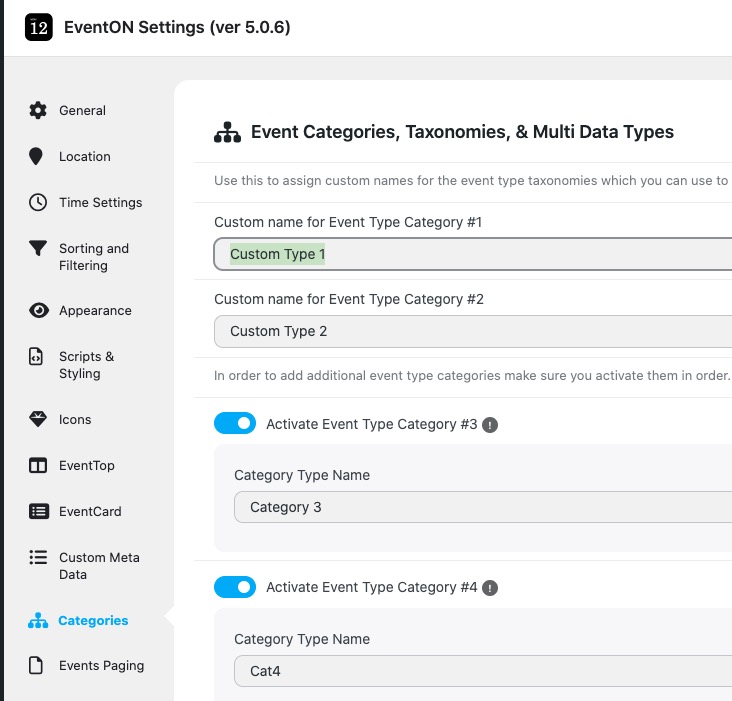
And change it to ”Events to Subscribe to”:
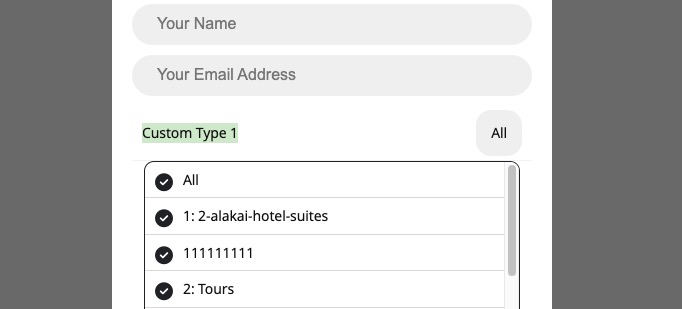
Now go to wp-admin > Events > Event Type > add Types as Events’ titles. Now users can subscribe to events, but as Event Types.
Please check and let me know.
Reply to: tickets(403849)
Thanks for your reply.
I already have the SUBSCRIBER addon. It is not working properly and I need help to fix it.
I have added a subscription button to this event:
https://www.mankindproject.org.au/wp-admin/post.php?post=4269&action=edit
The code for the button I used is this:
[evo_subscribe_btn event_id=”4269”]
I want the user to subscribe only to this specific event – not the whole calendar.
If that is not possible, then I want to subscribe to the
event_type_2=”149”
How can I do this? Or how can I get the popup window to deselect all the other event options, and just select the option that I want?
Unless I deselect all the other events from the popup, the plugin subscribes me to ”ALL” events, categories, locations and organisers.
Reply to: tickets(402850)
I guess I have to keep using the Event Aggregator plugin then.
Reply to: tickets(402907)
Older versions aren’t available after new version is released. So you can downgrade only if you have a copy of the previous version.
I believe that if you update to 3.1 and then manually clear your browser cache, it should work without issues. Could you try?
So, I suppose I’d like to get a refund for my purchase of rsvp 3.1. Can you assist me with that?
You renewed the add-on subscription to update it to 3.1? Could you elaborate?
Reply to: tickets(403683)
Unfortunately, yes. Could you try contacting the theme developer and ask about the issue?
Reply to: tickets(403848)
Hi Artem, We did try updating the software on a clone site for testing some time ago. We never resolved the issue of the seat map not displaying. I guess we can try it again with a fresh clone.. Let you know after I get it setup.
Reply to: tickets(403659)
Ashan,
It seems that when users send us private replies, they still can be accessed somehow:
[Replyto/403838]
Reply to: tickets(403659)
Could you don’t send any login info as reply and add it to ”Access Info” box on right side menu?
We are going to investigate the issue more.