So have a look at the shortcode on this page
https://theclearing.org/wp/eventon-testing/
so theres a tab layout where you can see the events list and also the events list as tiles
and thats all your events (I didn’t add the event type)
but as you can see it shows only 5 events per month with the ability to load more events within each month
you could set that to any number- 15 for example and when you click load more events it will load up to the number of events you set
so in the example on the web page each time you click load more it will load another 5 and then another 5
loads pretty quick.
and also we could help with css to make the load more events button bigger and/or a different color and also tweak the month names so they are larger if you want
I did. It is the correct time set everywhere (GMT +2h). The time is wrong in the calender view here: https://yogamitann.de/kursplan/
But when I click on an event the time is correct.
Hi,
thanks again for your support.
After adjusting the BuddyBoss “Private RSS Feeds” setting, the RSS feed is now live and accessible:
https://jugendarbeit.de/evofeed
Thanks for your assistance — this issue is resolved now.
The login is there: https://sommer-in-hamburg.de/wp-admin/index.php
Right from the beginning of this thread. But you dont use it?
The language issue in your plugin is really bad. Very often from the USA. But it is very important for germans and easy do to better. So its hurt a little, but I switched to THE EVENT CALENDAR, because the problem lasts to long and the options was to complicated.
Perfect, many thanks for the qucik resolution.
Thank you Ashan, the new version works great.
Please follow this instruction:
To update eventon addons: You can download latest eventon addons from myeventon > my account. Then you can go to your website, deactivate old addon and install new one and activate then delete the old addon. This link will further explain the process. Also you can follow us on twitter to get real-time announcements on updates!
Ashan,
The same on dev2:
Reply to: 389775
https://dev2.myeventon.com/wp-admin/post.php?post=58031&action=edit
https://dev2.myeventon.com/wp-admin/post.php?post=57980&action=edit
However, I am not sure if there is an issue.
ok i will try thank you for your support
I just re-checked this and I am not sure if there is an issue.
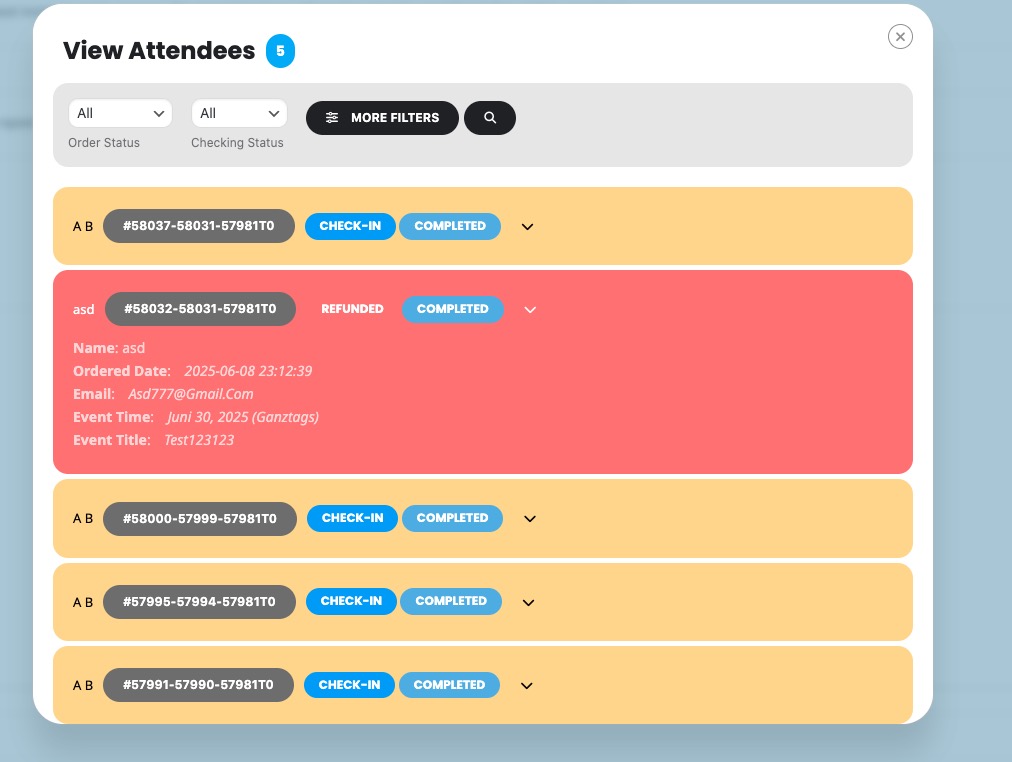
When you go to Edit Event and check View Attendees, it shows Refunded tickets as Completed:
However, Ashan will also check this.