Hello,
Thank you for your messages, I am going to assign this ticket to Ashan and he will be able to take it from here and find you a solution. Please allow some time for him to get back to you, we greatly appreciate your patience and thank you for being a eventon customer! Also please disable any IP blocking on your site if there are any.
Are you trying to lower the icon only or the full line?
It seems that icon lowers for both location and time lines. So could you remove the padding again from the code on the screenshot and then use:
.evoet_cx .evoet_time_expand .evcal_time i.fa {padding-top: 3px;}
To only lower the time icon.
Hello,
We are sorry for the delay. Ashan will check the issue ASAP.
Which event are you referring to? Could you give us an example?
I have tried to lower the number of repeats but then the events would not be visible in the calendar anymore.
Hi there,
I haven’t heard back since 4 weeks and wanted to ask by when the issue will be taken forward.
Best regards,
Bodo Schütze
Thank you. But that’s not pushing it down enough. I set it to 1px and it’s still like 1 pixel too high up. I need to move it down more. Setting it to 0px doesn’t move it down anymore.
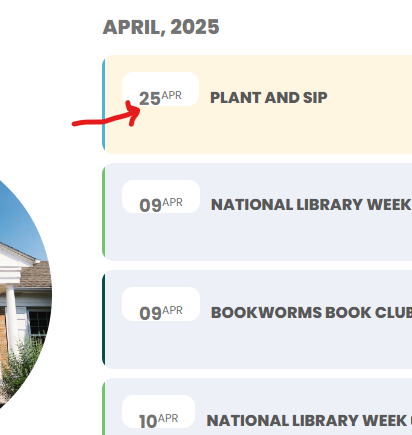
I am just trying to get some guidance on how to add a little padding to the bottom of the white date bubble shown here, so the gray text isn’t sitting at the very bottom. Thank you!
Thanks very much, we really appreciate it!
Thanks, that works partially (on some pages where there is no jump months option), it’s not working on this page, https://www.eventsbim.com/barbados-events/ when I jump months from July to August it still shows.
Hello
Thanks for the quick response.
I have activated the creation of the debug file, you can find it at this link: https://fontanamix.it/wp-content/debug.log
If needed I will send you the FTP credentials.
Waiting for the solution, thank you.
pEppE