thanks, I appreciate that as it is a key feature and a frustration for it to not work as expected
Archives: Replies
Replies for tickets on suppota
Reply to: tickets(387424)
ok great – that has worked!
how/where do i control which form fields appear in the location/organiser sections? (eg. with Autofill switched on, we don’t need user to add City, State, Zip etc) I would also like to adjust form fields for organiser section
can you think of a workaround for making fields compulsory?
Reply to: tickets(401990)
Ashan,
It seems that EventON uses two different mobile stylings for EventON > Single Events > Select eventTop style: Colorful and Clean White.
For Colorful EventON changes EventTop from row to column on mobiles, but not for Clean White. Please check this page:
https://dev2.myeventon.com/events/testimage/
https://dev2.myeventon.com/wp-admin/admin.php?page=eventon#eventon_social
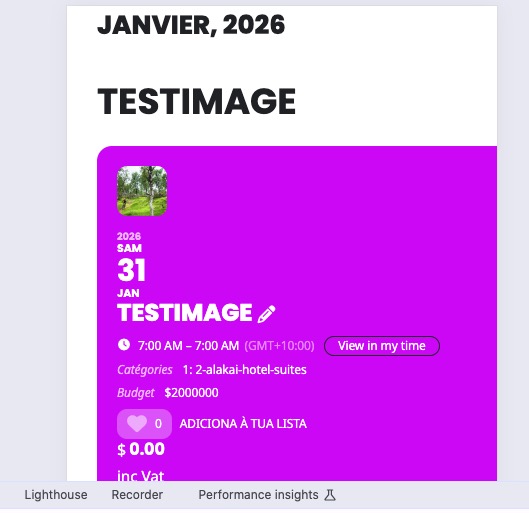
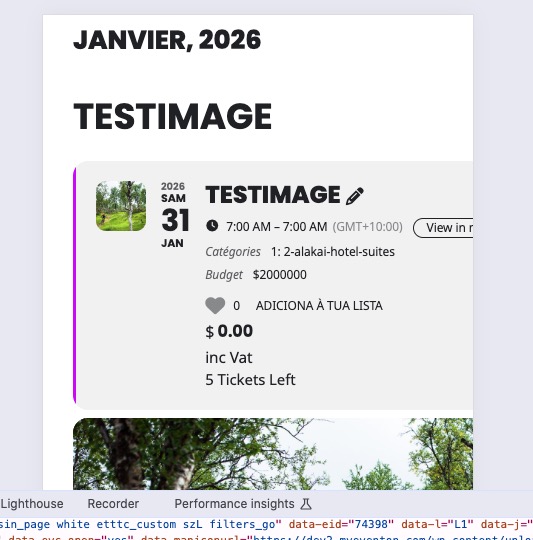
Reply to: tickets(401990)
It seems that EventON uses two different mobile stylings for EventON > Single Events > Select eventTop style: Colorful and Clean White.
For Colorful EventON changes EventTop from row to column on mobiles. Please check this page:
https://dev2.myeventon.com/events/testimage/
I am going to escalate this ticket to development to help in here. Please allow us some time to address this, and we truly appreciate your patience. Thank you for being a valued EventON customer!
Reply to: tickets(402284)
Hello,
EventON cannot be extended this way. Please try following this guide:
https://docs.myeventon.com/documentations/hooks-actions-filters/
Use one of these filters:
eventon_eventtop_one
eventon_eventtop_two
eventon_eventtop_html
You can find them in class-calendar-generator.php.
Please also note that we cannot fully help with PHP customizations since it’s against our Support Policy.
Reply to: tickets(402064)
Perfect! In order to avoid such issues, please create a clone website and update everything there just make sure that there are no incompatibilities between software and your server’s current configuration.
Reply to: tickets(402064)
sorry I found the probem. my Php version is low which stops EventON from updating which may cause a conflict with the newly updated ticket addon, after updating, the feature works again now.
Reply to: tickets(402064)
This approach is very destructive, we are running a live website with clients registering every day, I spent a lot of time setting up events for the whole year, I can’t just delete everything, I have to spend days redo everything, unless you instruct me how to do a backup
Btw, everything is updated
Reply to: tickets(402064)
I shared the login information, this problem really disrupts our work, please login and have a look
Reply to: tickets(402064)
Hi, the add on is updated to the latest version. My event is this Sunday and my guests can’t register themselves and I can’t download attendance list as usual.
Could you please just login my account and see what happens ?